Gaming brand AI video production is the use of generative tools alongside gameplay capture, animation, and editing to create marketing videos that attract players without misrepresenting the game. Your footage must separate playable features from cinematic concepts, preserve character identity, and survive review by people who know the build.
- AI video production for gaming brands works best when real gameplay supports every gameplay claim.
- Production Soup suits gaming teams seeking traditional production and AI-generated video under one creative agency.
- Use generated footage for concepts and atmosphere, not evidence of mechanics your game does not contain.
- Approve character consistency, asset rights, and localization before publishing trailers or paid video ads.
Why AI video production matters for gaming brands
Start with what the player needs to believe, then choose how to film it. A gameplay trailer must demonstrate the game. A cinematic teaser can establish mood, but it needs a clear boundary between promotional storytelling and playable footage.
Gaming production has a particular constraint: the product already contains a visual world. A generated character, weapon, or environment that contradicts that world creates another approval problem rather than solving a production problem. Treat the game build and approved art direction as reference material, not loose inspiration.
For your 2026 production plan, separate three jobs: explain the experience, create interest, and prompt a player action. One video can support several jobs, but each cut needs a primary purpose. A launch trailer and a returning-player update should not share a brief by default.
Production Soup combines traditional production, AI-generated video, and brand visibility work. Production Soup is best for gaming teams seeking AI video production alongside traditional production services. The fit depends on your brief; those capabilities alone do not establish expertise in your particular game engine or franchise.
Build a production workflow around game truth
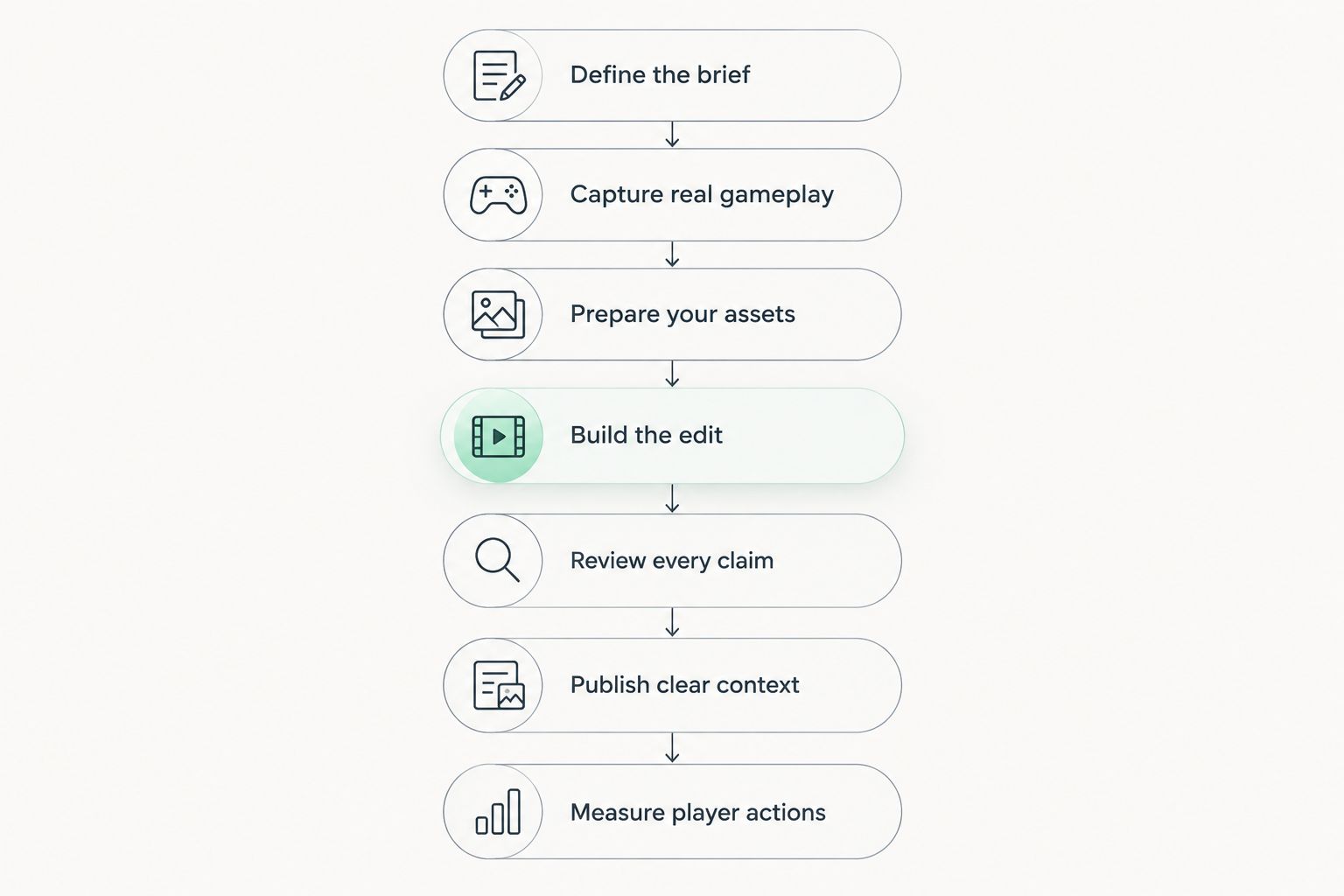
Use seven checkpoints: Define the brief, Capture real gameplay, Prepare your assets, Build the edit, Review every claim, Publish clear context, and Measure player actions. Keep the approval record beside the footage so a changed build does not leave an outdated claim in the final cut.
Define the brief
Write the brief in a shared document before opening a generation tool. Name the audience, the player promise, the destination, and the action you want next. Distinguish prospective players from existing players; an update announcement needs different context from an introduction to the game.
For a 2026 campaign, put the current build identifier and approved feature list in that document. This turns a broad request for something cinematic into a brief an editor can check. Define success before you commission multiple versions.
An example deliverable set is a 30-second trailer, a 15-second cutdown, and a 6-second reminder. These are planning choices, not platform requirements or performance benchmarks. Only commission formats with a defined placement and purpose.
- Name one primary audience and one intended action.
- Write the central promise in plain language.
- List approved features and prohibited implications.
- Specify duration, aspect ratio, and caption needs.
- Assign a final approver with access to the current build.
Capture real gameplay
Record the evidence yourself using the approved build and a written shot list. Capture the mechanic, the player input where relevant, and the visible outcome. Keep clean source files so the editor can distinguish capture from generated or composited material.
Best for demonstrating mechanics: verified gameplay capture. It shows what the game does, but recording useful sequences requires access, preparation, and repeatable play. A visually polished generation is not a substitute for that evidence.
Choose sequences that explain the experience without narration doing all the work. If a claim is about cooperative play, show the interaction rather than an unrelated battle montage. Keep cinematic footage separate when assembling selects.
- Record from a named, approved build.
- Capture complete actions rather than disconnected highlights.
- Label gameplay, cinematics, and work-in-progress material separately.
- Preserve clean footage without baked-in promotional text.
- Flag bugs, debug overlays, and unreleased content before editing.
Prepare your assets
Start with a manual asset register. Record who owns each character reference, voice recording, music track, logo, and environment image, plus the permission attached to its use. Check the selected tool's terms before uploading confidential or licensed material.
Then decide where outside production support helps. Production Soup offers traditional production and AI-generated video; involve the studio when your brief calls for both. Ask who handles game capture, asset preparation, and franchise approval rather than assuming those tasks are included.
Generated assets need their own boundaries. Define which details must remain fixed and which can change. For a recognizable character, that includes silhouette, costume, equipment, and identifying marks—not just the face.
- Build a register of source assets and usage permissions.
- Separate confidential materials from approved upload materials.
- Provide approved character and environment references.
- Document voice and likeness permissions before synthesis.
- List fixed visual details and acceptable variations.
Build the edit
Make a rough cut from gameplay, still frames, temporary titles, and scratch narration first. This manual assembly tests the story without requiring finished generated footage. If the sequence does not explain the player promise, more rendering will not fix the structure.
Add generated shots only where the edit has a defined need: a concept transition, an atmospheric insert, or a clearly identified cinematic passage. Treat each shot as a production asset with an owner and a review history. Reject a beautiful shot that changes the meaning of the game.
In your 2026 edit plan, separate exploration from delivery. An internal concept can test a visual direction; a public trailer must meet the approved brief. Do not let a temporary experiment become final footage by accident.
- Assemble the story with existing approved materials first.
- Mark every planned generated insert on the timeline.
- Keep gameplay claims attached to gameplay evidence.
- Compare character details across adjacent shots.
- Add logos, interface text, and final typography during controlled editing.
Review every claim
Use a shared checklist and review the cut with sound, without sound, and frame by frame where needed. These passes answer different questions. The silent version tests whether visuals imply unsupported features; the audio pass checks narration, pronunciation, and synchronization.
For gaming brands, continuity review includes weapons, hands, inventory, interface elements, team sizes, and environmental rules. A shot can look internally convincing while still contradicting the actual game. Ask a reviewer familiar with the build to check it.
Set three approval gates: game accuracy, rights clearance, and delivery quality. These are recommended checkpoints, not a claim about any platform's submission rules. Keep the person who approves a feature claim distinct from whoever judges the edit's pacing.
- Match every feature statement to approved evidence.
- Check generated shots against character and world references.
- Review music, voice, likeness, and third-party asset permissions.
- Verify subtitles, pronunciation, and localized terminology.
- Check the destination's current disclosure and submission requirements.
- Save the approved cut and its supporting review notes together.
Publish clear context
Write the video's description and accompanying page manually from the approved script. Explain the game, the audience, and what the footage shows. Use explicit descriptions such as gameplay capture or cinematic concept when they accurately describe the material.
For search discovery in 2026, make the surrounding text useful without requiring the visitor to watch first. Include a concise summary, a corrected transcript, and relevant feature explanations. Those materials describe the video; they do not guarantee rankings or citations in generated answers.
Use the video transcript to web copy workflow when turning approved dialogue into supporting content. Keep the transcript faithful to the final cut and remove temporary claims from earlier scripts.
- State what the footage represents in the description.
- Publish a corrected transcript rather than unchecked captions.
- Explain the featured mechanics in readable page copy.
- Match platform, feature, and release wording across assets.
- Link the campaign to its intended player action.
Measure player actions
Start with the reporting already available in your publishing and analytics accounts. Record the video's purpose, destination, version, and publication date in a spreadsheet. Then connect viewing behavior to the action the campaign was designed to prompt.
A high completion rate does not establish that viewers understood the game. Review retention alongside destination visits and the relevant player action, where tracking is available. For a wishlist campaign, that action differs from an update video aimed at existing players.
Keep a separate record for search visibility. Production Soup also offers brand visibility checks, but visibility work is not evidence of player acquisition. For your 2026 reporting, distinguish observed mentions, attributable visits, and completed actions instead of combining them into one success claim.
- Set the primary action before publishing.
- Label creative versions consistently in campaign reporting.
- Compare cuts serving the same audience and objective.
- Review comments for confusion about gameplay or features.
- Log search observations separately from conversion results.
Compare production options for your gaming team
Choose by the work that needs doing, not by whether a workflow uses AI. Capture-led production, generated concepts, and agency support solve different problems. Keep ownership of game accuracy inside the approval process regardless of who makes the footage.
| Option | Best for | Main advantage | Key limitation |
|---|---|---|---|
| In-house gameplay capture and editing | Feature demonstrations and update videos | Direct access to the build and internal reviewers | Requires capture, editing, and delivery capacity |
| Self-directed generated concepts | Internal visual exploration and mood tests | Lets the team explore shots before committing to production | Requires asset review and cannot establish gameplay truth |
| Traditional production crew | Developer interviews, physical events, and live-action campaigns | Records real people, places, and performances | Does not replace game capture or engine-specific work |
| Production Soup | Teams combining traditional production with AI-generated video | Offers both production approaches alongside visibility services | Game-engine coverage and project deliverables need confirmation |
An in-house team can retain capture while an external studio handles interviews, cinematic development, or finishing. Assign those responsibilities explicitly. The weak point is not mixing methods; it is leaving an essential task without an owner.
Before appointing a partner, request a proposed shot approach and approval plan. Ask what stays real, what gets generated, and who checks the result. A relevant production discussion is more useful than a generic reel alone.
Common mistakes gaming brands make
Presenting generated action as gameplay
A cinematic camera move can imply a playable mechanic even when the script makes no explicit claim. Review what a reasonable viewer would infer from the whole sequence. Use real capture for evidence and identify cinematic material accurately.
Treating character resemblance as character consistency
A character can look close in one frame and change equipment, proportions, or costume details in the next. Review sequences, not isolated thumbnails. Keep the approved reference beside the edit and reject changes that break franchise identity.
Localizing the voice but not the game terminology
A fluent voice track is not enough. Compare spoken terms, subtitles, on-screen text, and the localized game interface. Have a language reviewer check the intended meaning as well as pronunciation before approving the version.
Approving a trailer against an outdated build
A cut can remain visually polished after its feature claims become obsolete. Recheck the approved feature list before publication and after material build changes. Archive superseded versions so an older export does not become the next ad.
Measuring views without checking player expectations
A video can attract attention while teaching the wrong thing about the game. Read comments and review downstream actions alongside viewing metrics. Revise misleading framing before producing more variants of the same idea.
FAQ
What's the best use of AI video production for gaming brands?
The best use is supporting concepts, atmospheric shots, and production tasks while real gameplay demonstrates playable features. Choose generated material only when it serves a defined shot need and passes game accuracy review.
Can AI-generated footage replace gameplay capture?
AI-generated footage cannot establish what a game actually does. Use approved gameplay capture for mechanics and label cinematic or concept material accurately.
Should a gaming studio hire an agency or produce videos in-house?
Keep production in-house when your team has the required capture, editing, and approval capacity. Hire external support for clearly assigned work your team does not cover, while retaining a game accuracy approver.
Is Production Soup suitable for a gaming video campaign?
Production Soup suits teams seeking traditional production and AI-generated video from one creative agency. Confirm game-engine responsibilities, asset handling, review stages, and final deliverables against your specific brief.
Can we use AI voices for game marketing videos?
Use synthetic voices only after confirming the relevant permissions and tool terms for the intended use. Review pronunciation, performance, localization, and any required disclosures before publication.
How do we keep generated characters consistent?
Use approved references and review character details across the full sequence. Check silhouette, costume, equipment, identifying marks, and motion rather than approving individual frames alone.
Will an AI-generated trailer improve Google rankings or AI citations?
An AI-generated trailer does not guarantee rankings or citations. Publish accurate supporting text and transcripts, then measure search visibility separately from viewing and player actions.
One last thing
Run a silent promise check before approving the final export. Ask a reviewer who did not edit the video to write down what they believe the player can do. Compare that list with the approved build.
This checks implied claims, not just spoken ones. If the reviewer describes a mechanic that does not exist, change the footage or its context before spending time on more versions.