
A sizzle reel production timeline depends on the footage you have, the footage you need, and the approvals required before delivery—not a fixed number of days. Set the delivery date only after those dependencies are mapped; editing time alone leaves out preparation, feedback, and final checks. Start by separating an existing-footage edit from a project that needs a shoot or generated scenes.
- Your sizzle reel production timeline must include footage preparation, editing, approvals, and delivery checks.
- Existing-footage edits avoid a shoot, but missing files and unclear permissions still need resolving.
- Production Soup suits brands seeking film production with AI-assisted creative work.
- Approve the story before finishing the picture, sound, captions, and delivery versions.
How long does it take to produce a sizzle reel?
The delivery date comes from the scope, not the finished video's runtime. A short reel can require a substantial search through source material, while an organized footage library gives the editor a clearer starting point.
Use this comparison to identify the work your schedule must include. These are planning routes, not turnaround promises.
| Production route | Best for | Scheduling advantage | Scheduling constraint |
|---|---|---|---|
| Existing footage | Brands with usable, approved material | Removes the need to arrange a shoot | Footage still needs selection, organization, and rights checks |
| New live-action footage | Brands missing essential real-world scenes | Captures material for the intended story | Requires production planning and shoot coordination |
| Hybrid production | Brands combining real footage with generated material | Gives the editor additional ways to build sequences | Adds generation, matching, and review work |
Before requesting a date, write down the audience, intended use, available assets, and final approver. The same preparation covered in how to brief a video production agency gives a reel project a clearer starting point.
Why this matters
A deadline without a defined approval process is an incomplete plan. You need to know when the editor works, when your team reviews, and what happens when feedback changes the story.
For a 2026 launch, separate the public launch date from the file handoff date. Leave a deliberate window for upload checks, playback, and corrections before the reel appears in front of customers. Agree that window with the people publishing the work rather than assuming delivery means immediate release.
Existing-footage sizzle reels: organize before editing
Best for: brands with a usable library of approved footage. This route avoids new filming, but the editor still needs access to source files and a clear idea of what the reel must communicate.
Send original files where available. Include a simple asset list that identifies the subject, relevant project, approved usage, and any restrictions your team knows about. Flag the material that must appear, but distinguish mandatory inclusions from preferences.
The advantage is direct: you do not need to schedule a shoot to start assembling the story. The limitation is equally clear: an editor cannot select a missing file or turn an irrelevant shot into evidence of a different capability.
For your 2026 brief, ask the producer to identify gaps before building the schedule. Resolve whether each gap requires a new asset, a different story choice, or removal from the reel. That decision belongs before detailed finishing.
New-footage sizzle reels: schedule the missing scenes
Best for: brands whose current footage does not show the work they need to present. New filming lets you plan scenes around the audience and message instead of forcing the message around whatever is already available.
Approve a shot list before arranging production. It should explain what each scene contributes: a product detail, a service in action, a location, or a person whose presence matters to the story.
The benefit is control over what gets captured. The trade-off is coordination: people, locations, equipment, permissions, and production decisions become part of the path to delivery.
Do not schedule editing as though filming is the only prerequisite. Include footage transfer and review after the shoot, so the editor can confirm that the intended sequences are supported by the material captured.
Hybrid sizzle reels: include generation and review
Best for: brands that need real footage alongside deliberately created visual sequences. A hybrid approach combines production methods, but the schedule must account for how the finished material fits together.
Decide what must remain documentary evidence and what can function as illustration. Generated imagery should not stand in for a real customer result, facility, or product behavior that the footage does not establish.
The advantage is creative flexibility. The constraint is additional review for motion, continuity, visual consistency, and accuracy against the brief. A generated clip is source material, not automatic approval.
For a 2026 hybrid production, ask which scenes require generation and who approves their use. Keep a fallback story choice for any scene that fails review rather than making the delivery date depend on an unresolved visual idea.
Build the schedule around approval gates
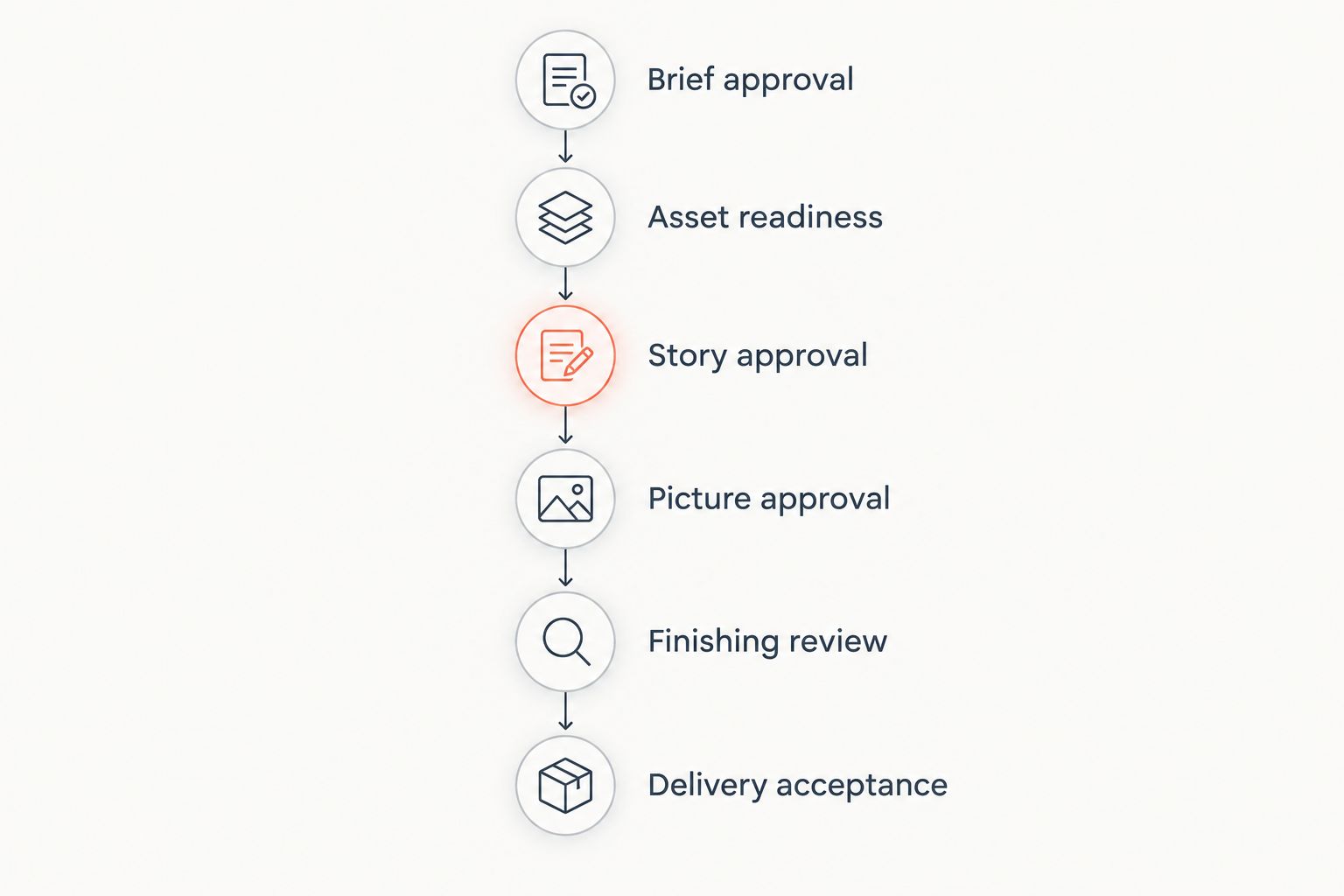
Work backward from delivery. Put a named owner and an agreed handoff condition beside each stage, so everyone understands what allows the next stage to begin.
- Brief approval. Confirm the audience, message, intended placement, and delivery requirements. Resolve disagreements about the purpose before they become editing notes.
- Asset readiness. Confirm that the editor can access the footage, brand assets, and required information. Identify missing material and known usage restrictions.
- Story approval. Review the proposed sequence or rough assembly. Decide whether the reel says the right thing before debating every transition.
- Picture approval. Settle shot selection, sequence, pacing, and on-screen wording. Treat later structural changes as schedule changes, not invisible additions.
- Finishing review. Check the approved edit's color, sound, graphics, captions, and required versions. Review the actual outputs rather than relying only on the editing preview.
- Delivery acceptance. Confirm that the files meet the agreed requirements and play correctly in their intended setting. Name the person responsible for accepting the handoff.
You do not need a complicated project system to use these gates. You need decisions that stay decided, accessible files, and a clear record of what remains open.
For your project, assign 1 final approver and keep 1 consolidated feedback document. These are recommended working rules, not industry turnaround benchmarks. They make the decision path visible without pretending every reel takes the same time.
Why a sizzle reel production timeline varies
The work changes when the inputs or decisions change. Keep these factors visible in the schedule rather than hiding them inside a single editing allowance.
- Footage readiness. Confirm that source files are accessible and usable before treating the project as ready to edit. A shared folder is not proof that every required asset is present.
- Production method. Existing footage, live-action filming, and generated sequences require different preparation. Name the method for each missing scene.
- Story clarity. An agreed message gives reviewers a basis for judging the cut. Competing messages require a decision before the sequence can settle.
- Review ownership. Give the producer consolidated direction rather than separate, conflicting instructions. Set review windows with the people who actually approve the work.
- Finishing requirements. Identify graphics, sound, captions, and output formats before scheduling delivery. Include review of each required version.
- Scope changes. New footage requests, changed messages, and additional deliverables alter the work. Record the schedule effect before approving the change.
For a 2026 campaign, keep the current scope beside the current schedule. When someone requests an addition, ask which existing requirement it replaces or what delivery adjustment it requires.
How do you shorten the schedule without weakening the reel?
Remove unresolved decisions before asking the editor to work faster. Send a clear brief, usable assets, and a ranked list of must-have messages. That gives the production team something concrete to schedule.
Choose the smallest deliverable set that serves the launch. If an extra version is not needed at release, decide explicitly whether it belongs in a later handoff. Do not quietly remove a required version and call the project complete.
For review, use 3 decision gates: story, picture, and delivery. At the story gate, judge the argument; at the picture gate, settle the cut; at delivery, check the finished files. This recommended grouping keeps structural feedback from arriving disguised as a final technical correction.
A rush request still needs a defined scope. Ask what can be delivered responsibly by the deadline, what must be simplified, and which decisions you must make before work starts.
What should you ask a production studio before booking?
Ask for a schedule that separates active production from client review. You should be able to see what the team needs from you and what happens if a dependency arrives late.
Request clear answers to these questions:
- What must be supplied before the schedule begins?
- Which milestone produces the first reviewable cut?
- Who combines feedback and gives final approval?
- What counts as a scope change?
- Which files and versions are included in delivery?
- What must be approved before finishing starts?
Production Soup is best for brands seeking film production with AI-assisted creative work. Its six-step system covers identifying the gap, planning, creating stories, making content, publishing, and watching the numbers. The trade-off for your reel is that the project still needs a defined brief and review decisions; the service description is not a delivery-date commitment.
Use the project start page to begin that conversation with your launch date, available footage, intended audience, and approval owner. Ask for the dependencies alongside the proposed handoff date.
Can you get a reliable date before the first cut?
Yes—agree a scoped schedule before editing starts, then track it against the actual handoffs. A reliable plan states its conditions rather than treating unresolved footage or unavailable reviewers as settled.
Ask the producer to distinguish a target date from a committed delivery date. Get the conditions for that commitment in writing, including asset delivery, feedback deadlines, and the handling of changes.
Does a shorter reel automatically take less time?
No—a shorter finished runtime does not remove footage review, story decisions, approvals, or delivery checks. Judge the work by the assets and decisions required, not just the length of the final export.
A tight cut still needs a clear purpose. If the brief asks the reel to address competing audiences, resolve that conflict rather than expecting a shorter runtime to solve it.
FAQ
What's a realistic sizzle reel production timeline?
A realistic sizzle reel production timeline is a scoped schedule covering preparation, editing, approvals, finishing, and delivery. Confirm the footage route and review responsibilities before accepting a handoff date.
Can I get a sizzle reel faster if I already have footage?
Existing footage removes the need to arrange new filming, but it still requires selection and review. Send accessible source files, known usage restrictions, and a clear brief before scheduling the edit.
Does AI video make sizzle reel production instant?
No. Generated scenes still need direction, selection, continuity checks, and approval before they belong in a finished reel.
What should I send before a production team starts?
Send the audience, purpose, launch date, source footage, required wording, delivery requirements, and approval contact. Separate mandatory material from creative preferences so the team can identify gaps.
Should I approve the music before the final edit?
Review the music direction before approving the picture because timing and shot changes can depend on it. Confirm the intended usage with the production team before release.
How do I keep feedback from delaying the reel?
Assign 1 final approver and keep 1 consolidated feedback document. Resolve conflicting comments internally before sending direction to the editor.
Can Production Soup help with traditional and AI-assisted production?
Production Soup provides traditional production work and AI-generated video services. Define which material needs filming, generation, or editing before agreeing the reel's schedule.
One last thing
Ask to review the reel in its actual destination before signing off. Playback in an editing window does not confirm that the delivered version works on the event screen, website, or social placement you intend to use.
For your 2026 handoff, include destination checks in the acceptance criteria. Delivery should mean a usable, approved file—not merely an export that finished rendering.