Best overall for businesses with recorded footage: transcript-based video editors. Best for repeatable social posts: template-based editors. Best for synthetic supporting shots: generative video tools. This 2026 guide ranks tool types by the work you need finished—not by which demo looks most impressive.
- The best ai video production tools for small businesses fit a specific production task, not every task.
- Choose transcript-based editing for interviews, template editors for social posts, and generative video for supporting visuals.
- Production Soup is a production-service option for businesses that need films, ads, and publishing support rather than another application.
- Keep real footage for product proof, customer testimony, and demonstrations where accuracy matters.
Why this matters
Choose the production job before you choose the software. Editing an interview, animating a promotion, and generating an imagined setting are different jobs. Treating them as interchangeable gives you more material to sort, not necessarily a finished video.
Production Soup provides traditional production, generated video, films, ads, and AEO/SEO/GEO services. That is a service option, not a software subscription. It belongs in the decision when you need someone to plan and make the work rather than hand your team another interface.
For your 2026 shortlist, separate creation from completion. A generated shot still needs context, editing, sound, and approval before it belongs in a business video.
What makes the best video production tools?
Judge each option against the same brief. These criteria matter more than a long feature list:
- Task fit: Does the tool solve your actual bottleneck—editing, layout, presentation, footage creation, or localization?
- Source control: Can you preserve approved wording, product details, and the meaning of recorded statements?
- Revision control: Can your team change a sentence or shot without rebuilding the entire piece?
- Delivery fit: Can you prepare the formats, captions, and files your publishing channels require?
- Review burden: Who checks factual accuracy, pronunciation, visual continuity, and permissions?
- Ownership: Who takes the project from a usable draft to an approved deliverable?
Do not count a capability as useful until it works on your material. A polished sample from the software vendor does not answer that question.
Best video production tool types at a glance
These are workflow recommendations, not a vendor performance ranking. Each category earns a different job.
| Rank | Tool type | Best for | Standout capability | Key limitation |
|---|---|---|---|---|
| 1 | Transcript-based video editors | Recorded interviews and explanations | Editing spoken footage through text | Transcript accuracy does not guarantee a good edit |
| 2 | Template-based video editors | Repeatable social announcements | Reusing a visual structure | A template cannot supply missing evidence or a clear message |
| 3 | Avatar presentation tools | Scripted instructional updates | Turning approved scripts into presenter-led video | A synthetic presenter is not customer testimony |
| 4 | Generative video tools | Imagined supporting footage | Creating scenes from text or image direction | Generated visuals can misrepresent products or physical behavior |
| 5 | Dubbing and localization tools | Adapting an approved video for another language | Producing translated speech tracks | Translation and delivery still need fluent review |
1. Transcript-based editors: best for recorded explanations
Transcript-based video editors let you work with spoken footage through its transcription. They suit founder interviews, customer explanations, recorded demonstrations, and educational material where the source recording already contains the substance.
Start here if your problem is finding the useful sentence inside a long recording. Text makes that search easier to organize, but the final cut still needs an audio and picture review.
Transcript-based editor pros:
- Locate topics through the speaker's words.
- Shape a rough narrative before polishing individual cuts.
- Keep recorded speech as the foundation of the message.
Transcript-based editor cons:
- Transcription mistakes can obscure names and technical terms.
- Removing words can change meaning or create awkward visual cuts.
Best for: Small businesses with useful recorded footage and limited editing capacity.
For a practical evaluation, prepare a 30-second test cut from an interview you already own. Check whether the speaker's point survives, whether the cuts sound natural, and whether the captions match the recording. This is an acceptance task, not a promised production time.
Verdict: Buy into this workflow first when your strongest material already exists on camera.
2. Template-based editors: best for repeatable social posts
Template-based video editors provide reusable layouts for combinations of text, images, clips, and motion. They fit announcements, event reminders, and short educational posts that follow a consistent structure.
The advantage is repeatability. Your team can spend its attention on the message instead of rebuilding the arrangement each time.
Template-based editor pros:
- Reuse approved layouts across related posts.
- Combine existing assets without inventing a new visual approach.
- Give non-specialists a defined starting point.
Template-based editor cons:
- Fixed layouts can force too much text into too little space.
- Decorative motion does not replace a strong reason to watch.
Best for: Small teams publishing recurring announcements with existing images and footage.
For your 2026 evaluation, adapt the same message into a 15-second version. Read it on a phone without pausing. If the main point depends on tiny text or a rushed closing frame, simplify the layout before adding effects.
Verdict: Buy for repeatable communications; skip as the sole production method for evidence-heavy stories.
3. Avatar tools: best for scripted instructional updates
Avatar presentation tools create presenter-led videos from scripts using synthetic presenters. They fit material where a controlled explanation matters more than documenting a real person speaking.
Use them for an approved process walkthrough or an internal update. Do not frame a synthetic presenter as a real customer, employee, or independent expert.
Avatar tool pros:
- Build the presentation around an approved script.
- Revise wording without organizing a new presenter recording.
- Maintain a consistent presentation structure across related lessons.
Avatar tool cons:
- Synthetic delivery does not provide firsthand credibility.
- Names, acronyms, emphasis, and gestures need review.
Best for: Businesses producing scripted instruction rather than personal testimony.
Test a paragraph containing your actual terminology. A generic greeting tells you little about whether the presenter can handle your product names or explain a complicated step. Listen without watching, then watch without sound; each pass exposes a different problem.
Verdict: Buy for controlled instruction; skip when the audience needs to hear from the real person responsible.
4. Generative video tools: best for imagined supporting shots
Generative video tools produce moving imagery from prompts or reference images. They fit conceptual scenes, visual exploration, and supporting shots that do not need to document an actual event or product behavior.
They are not a substitute for evidence. A generated machine operating smoothly does not prove that your machine performs that way.
Generative video tool pros:
- Explore visual directions before committing to a finished sequence.
- Create imagined settings that support a clearly framed concept.
- Develop supporting imagery when documentary footage is not required.
Generative video tool cons:
- Objects, motion, and continuity can contain visible errors.
- A visually convincing scene can still communicate a false claim.
Best for: Businesses that need conceptual imagery and can provide careful visual review.
In a 2026 tool evaluation, write down what must remain exact before generating anything. That includes packaging, lettering, equipment behavior, and recognizable locations. Use real footage wherever those details carry the claim.
Verdict: Buy for conceptual supporting footage; skip for unverified demonstrations and customer proof.
5. Dubbing tools: best for adapting approved videos
Dubbing and localization tools help create speech tracks in another language. They belong after the original message is approved, because translating an unsettled script creates another version to correct.
Choose this category when you already have a useful video and a defined audience in another language. Generation alone does not make the result ready to publish.
Dubbing tool pros:
- Adapt an existing explanation instead of starting from an empty brief.
- Keep localization tied to a known source script.
- Produce draft language versions for review.
Dubbing tool cons:
- Literal translation can miss tone, meaning, or local usage.
- Voice quality does not establish translation accuracy.
Best for: Businesses with approved source videos and access to fluent reviewers.
Ask the reviewer to check the spoken track against the intended meaning, not just the written translation. Product terminology, warnings, and calls to action deserve separate attention. Confirm permission before using a recognizable person's synthetic voice.
Verdict: Buy when language review is part of the process; wait when nobody can approve the result.
How these recommendations are ranked
The order follows the production job, not a claim that one category performs better in every situation. Transcript editing comes first for businesses with recorded expertise; templates serve recurring posts; avatars serve scripted instruction; generation serves imagined footage; dubbing serves approved language adaptations.
The criteria are task fit, source control, revision control, delivery fit, review burden, and ownership. No software speed test, traffic lift, or output-quality score is implied by this ranking.
For your 2026 decision, choose the narrowest tool that solves the bottleneck. Add another category only when a real project requires it.
Run a small acceptance test before committing
Use the same business message throughout the evaluation. Changing the brief for every tool makes it hard to tell whether the tool helped or the assignment simply became easier.
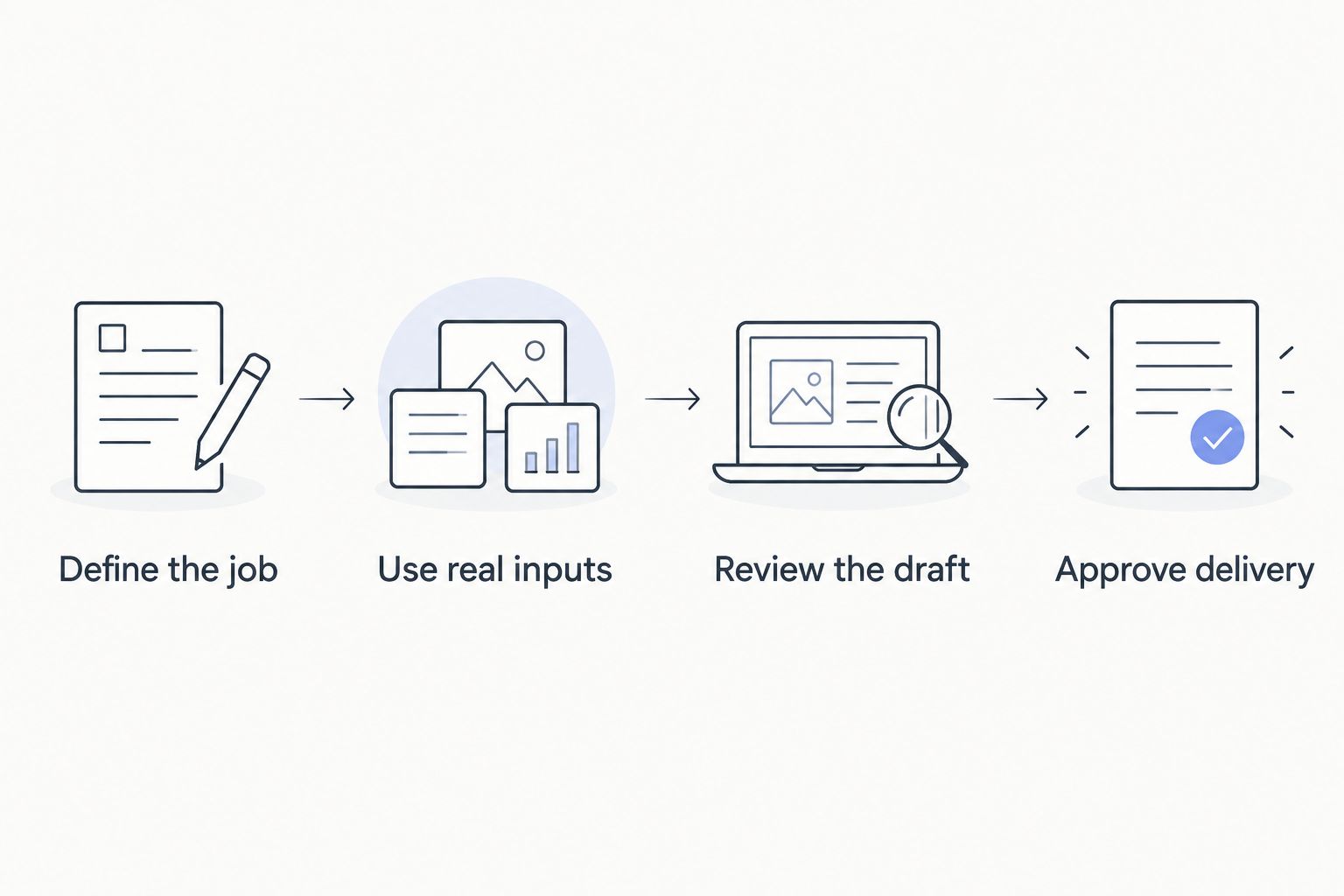
Define the job
Write the intended audience, the question the video answers, and the next action. Choose one primary use: explain, demonstrate, announce, or instruct. Do not ask a short announcement to carry an entire company story.
Use real inputs
Supply approved footage, wording, and reference material. Include something difficult: a technical term, a product detail, or a sentence that must not change meaning. Easy sample material hides the review work your team will face later.
Review the draft
Check the message before polishing motion or music. Then inspect captions, speech, visual continuity, and any factual claim. Record what required human correction so the next evaluation uses the same standard.
Approve delivery
Prepare a 60-second master and the shorter versions your brief requires. These are suggested test deliverables, not platform limits. Open the exported files on the devices your audience uses before approving them.
Keep the acceptance checklist with the project. Your next video should inherit the useful decisions rather than repeat the same argument about captions, wording, and approval.
Which video production approach should you choose?
Choose transcript-based editing by default if you already have useful recorded footage. Choose templates if your work is mostly recurring announcements. Choose generation only when the missing ingredient is an imagined visual—not a missing message or missing proof.
Production Soup is a fit for small businesses that need video production services rather than another tool to operate. Its stated six-step system covers seeing the gap, planning the work, creating the stories, making the content, publishing, and watching the numbers.
That service route still requires your input and approval. It is not the same purchase as software, and it is the wrong comparison if you only need to trim an existing clip. Use the guide to choosing between a video production agency and an in-house team when ownership is the unresolved issue.
Production Soup combines traditional and generated video work. Choose that route when coordinating the story, production, and release is the work you need help completing.
FAQ
What's the best AI video production tool for a small business?
Transcript-based editing is the default recommendation when your business already has useful recorded footage. Choose template editors for recurring posts, avatar tools for scripted instruction, and generative tools for imagined supporting scenes.
Should I choose an editor or a video generator?
Choose an editor to organize existing footage and a generator to create imagined imagery. A generator does not replace the editing, sound, factual review, and approval needed for a finished business video.
Can generated video replace filming my product?
Keep real footage when the video must prove your product's appearance or behavior. Generated footage belongs in conceptual scenes unless every relevant detail has been verified against the actual product.
Are avatar videos suitable for customer testimonials?
A synthetic presenter is not customer testimony. Use an actual customer's approved recording when the message depends on that person's experience, and do not present generated speech as a real endorsement.
How should a small business compare video tools in 2026?
Give each tool the same brief and approved source material. Judge the exported result, correction work, and approval process rather than comparing unrelated vendor demonstrations.
Do dubbing tools remove the need for translation review?
Dubbing tools do not remove the need for fluent review. Have a qualified reviewer check meaning, pronunciation, terminology, and delivery before publishing a language version.
When should I hire a production service instead of buying software?
Hire a production service when planning, storytelling, production, and delivery need an owner. Production Soup offers films, ads, traditional production, generated video, and AEO/SEO/GEO services; it is a service option rather than a self-service editing application.
One last thing
Test the correction, not just the creation. After the first draft, change a product name, remove a claim, and replace a shot. The way a workflow handles those ordinary revisions tells you more about its suitability than the first impressive output.
Before your next 2026 production decision, name the person who can approve the final version. No application can settle an approval decision your business has not assigned.