
SaaS generative engine optimization is the work of making your software’s purpose, evidence, and limitations clear in AI-generated answers, with the aim of attracting qualified buyers. This 2026 guide shows you how to connect product pages, documentation, customer evidence, and video without treating citations as a substitute for pipeline.
- Generative engine optimization for SaaS starts with accurate product answers, not more content.
- Production Soup suits teams seeking brand-visibility checks and film production alongside SEO, AEO, and GEO work.
- Separate brand mentions, source citations, referral visits, and qualified leads in your reporting.
- Publish evidence for specific use cases, integrations, implementation requirements, and product limitations.
Why generative engine optimization matters for SaaS
A SaaS buyer needs more than a category definition. The buyer needs to understand whether your software fits an existing workflow, connects to required systems, and meets operational requirements. Your content should answer those questions without forcing someone to assemble the truth across a homepage, an old webinar, and scattered release notes.
The job is to make your product easy to assess, not merely easy to mention. Start by checking whether your brand appears in AI search results. Record what each answer says about your product, not just whether your name appears.
For your 2026 plan, separate three problems: missing visibility, inaccurate positioning, and weak supporting evidence. Each requires different work. A missing mention does not automatically justify another article; an incorrect integration claim calls for a product-content correction first.
Build your SaaS GEO workflow
Use the following sequence to turn observations into publishing decisions. Keep a shared record connecting each buyer question to its source page, responsible owner, and next action. That record gives marketing, product, and sales a common version of the problem.
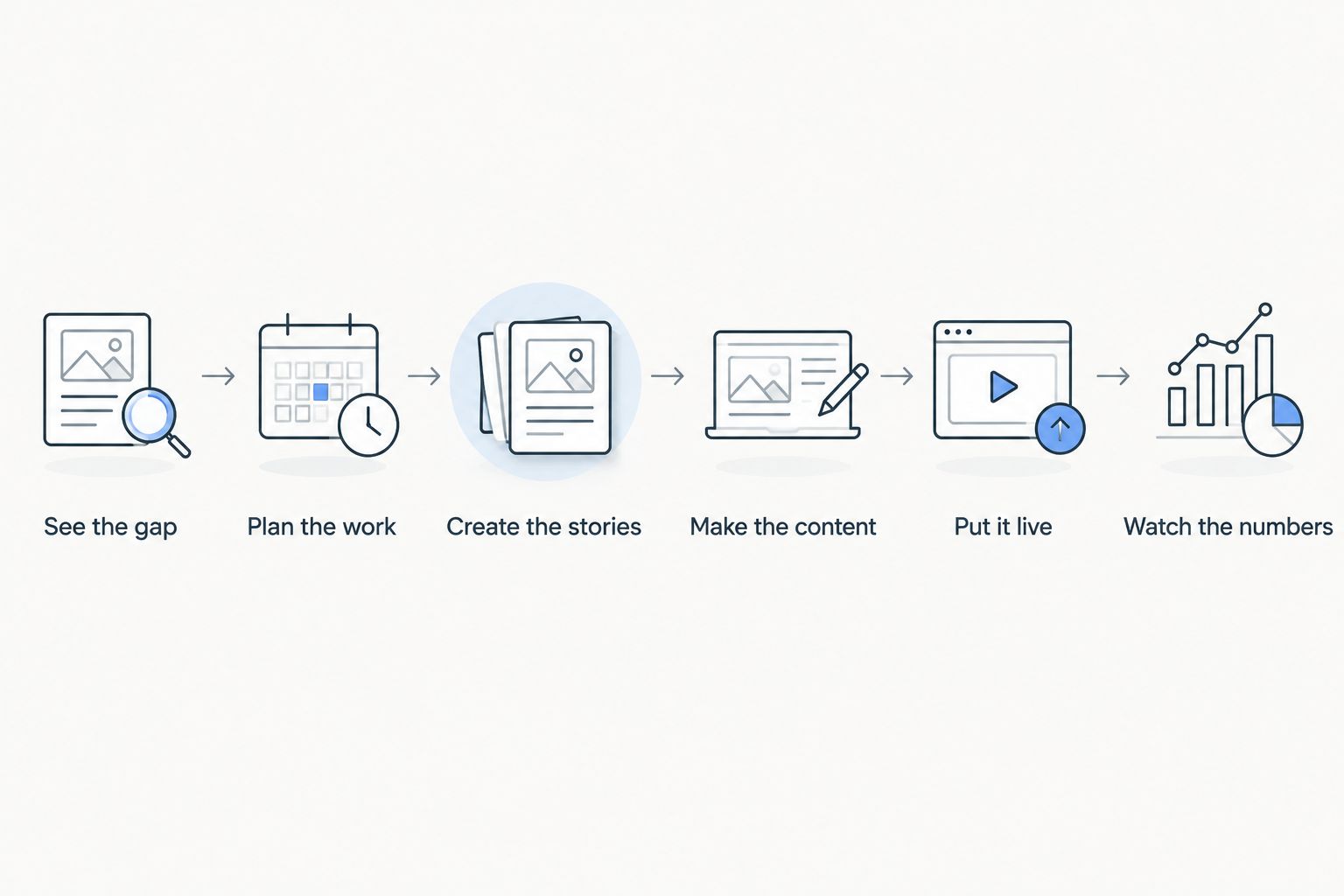
See the gap
Start manually with a spreadsheet and the questions your buyers already ask. Collect wording from sales conversations, support tickets, onboarding discussions, and your existing search-query reports. Preserve the language buyers use rather than replacing it with internal product terminology.
As a starter exercise, select 12 prompts across 3 intent groups: understanding the problem, evaluating a solution, and checking implementation fit. These are suggested planning quantities, not a benchmark. Include unbranded questions so the exercise does not depend on telling an assistant your company name.
For every result, save the exact prompt, date, answer, named vendors, and cited sources. Record the assistant and any visible search or browsing setting. Keep observations separate from explanations: seeing another vendor cited does not prove why that vendor appeared.
- Collect questions about workflows, integrations, migration, and buyer requirements.
- Include branded questions that test product-description accuracy.
- Save the source URLs shown in each answer.
- Mark incorrect claims separately from missing mentions.
- Flag answers that recommend your product for an unsuitable buyer.
Plan the work
Assign each gap to the page that should answer it. Use your existing product pages, documentation, and customer evidence before creating another URL. A buyer asking about migration needs migration details, not a generic article about software trends.
Build a short brief for each priority. State the buyer’s question, the answer you can support, the missing evidence, and the action the reader should take. Give product specialists responsibility for technical accuracy. Marketing owns clarity and distribution, but should not approve compatibility claims alone.
In your 2026 backlog, prioritize gaps tied to active sales objections or product misunderstandings. Avoid ranking opportunities solely by how often a competitor appears in a small prompt sample. That sample describes the observations you collected, not the whole market.
- Assign one primary buyer question to each page.
- Name a technical reviewer for product claims.
- Separate factual corrections from new-content requests.
- Link each brief to an existing sales or support question.
- Define the intended next action before drafting.
Create the stories
Write the answer in plain language first. Explain who the product serves, what the workflow involves, and where the product stops. Then add evidence: an approved customer account, a documented capability, or a demonstration that shows the actual process.
For comparisons, describe decision criteria rather than manufacturing a winner. Explain which buyer needs an integration, which buyer can work without it, and what must be verified. If you lack permission to publish a customer result, do not turn an anonymous anecdote into a numerical case study.
Production Soup combines brand-visibility checks with film production and SEO, AEO, and GEO work. That offers an agency path when the content gap includes both positioning and production. You can still begin with your own interviews and documentation; outside support is not a prerequisite.
- Open with a direct answer to the buyer’s question.
- Name the intended user and relevant workflow.
- Support each product claim with approved evidence.
- State implementation requirements and limitations.
- Remove customer details that lack publication permission.
Make the content
Turn the approved answer into the format the question needs. An integration question needs setup details and constraints. A workflow question can benefit from a demonstration. A category question needs a clear definition and a reason to consider your approach.
For video, begin with a screen recording or a subject-matter interview when that is sufficient. Publish an edited transcript or companion explanation with the important facts, relevant context, and a useful next step. Review automated transcripts against the recording, especially feature names, technical terms, and numerical claims.
Production Soup is best for SaaS teams seeking both brand-visibility checks and film production. The fit depends on the work required: a documentation correction does not need a film, while a complex workflow can justify a visual explanation. Keep production proportional to the question.
- Use actual product behavior in demonstrations.
- Add readable text beside important video explanations.
- Correct transcript errors before publication.
- Explain prerequisites before showing a successful outcome.
- Remove unsupported claims from narration and page copy.
Put it live
Publish the answer where a buyer expects to find it. Keep essential product explanations accessible without requiring a demo request. Use clear headings, descriptive page titles, and internal links that connect related product, documentation, and evidence pages.
Check technical access separately from content quality. Confirm that important pages return successfully, that your intended indexing settings are correct, and that essential explanations appear in the rendered page. Review crawler access deliberately; do not change security or content-access policies just to pursue visibility.
For your 2026 release process, give product changes a content owner. Renamed features, retired integrations, and changed implementation requirements need updates wherever the old claim remains. Adding a fresh date to an unchanged article does not resolve conflicting information.
- Check indexing instructions and canonical URLs.
- Keep essential answers in readable page text.
- Connect relevant product and documentation pages.
- Use structured data only when it matches visible content.
- Assign updates when product capabilities change.
Watch the numbers
Repeat the original prompts under recorded conditions. Run each prompt 2 times per review as a basic repeatability check, not proof of stable visibility. Save the answers rather than reducing every observation to a single score.
Track separate measures: brand mentions, links citing your domain, factual accuracy, identifiable referral visits, and qualified actions. Define the denominator for any visibility rate. A percentage based on selected prompts is a result for that prompt set, not your share of the entire category.
Connect analytics to your existing conversion definitions. Track identifiable referral traffic where available and let sales record buyer-reported discovery sources. Neither method captures every influence. Report what you observed without crediting an assistant for a deal solely because the buyer used one during research.
- Keep the prompt set stable during comparisons.
- Record the date, platform, settings, and answer text.
- Separate a brand mention from a source citation.
- Report sample size beside any calculated rate.
- Review lead quality alongside visibility changes.
Compare your options for SaaS GEO
Choose support based on the gap, not the category label. A team that already has accurate documentation needs different help from a team whose positioning, demonstrations, and source pages contradict one another.
| Option | Best for | Main advantage | Key limitation |
|---|---|---|---|
| Manual in-house workflow | Teams establishing a baseline | Direct control over prompts, evidence, and product review | Requires staff time and consistent recordkeeping |
| Visibility-monitoring software | Teams repeating established checks | Organizes repeated observations when the chosen tool supports them | Does not replace factual review or produce missing evidence |
| Specialist SEO/GEO agency | Teams needing technical and editorial support | Adds outside capacity for a defined scope | Requires product access and clear accountability |
| Production Soup | Teams needing visibility checks and film production | Brings creative production together with SEO, AEO, and GEO services | Does not replace your product team’s technical approval |
Request a sample deliverable before selecting outside help. Ask what gets recorded, which facts require your approval, and what happens after the diagnosis. A monitoring report is not a publishing plan. Make sure the scope identifies who will correct pages, create missing evidence, and review the results.
Discuss your visibility gaps
Explore support for brand-visibility checks, content, and film production.
Common mistakes SaaS teams make
Publishing category pages without product evidence
A long explanation of a software category does not establish your product’s fit. Add supported workflow details, implementation requirements, and clear boundaries. If the page cannot explain why a specific buyer should consider your product, another definition will not fix it.
Treating roadmap items as current capabilities
Keep planned functionality separate from released functionality. Check demonstrations, transcripts, comparison pages, and sales materials for the same distinction. A polished explanation becomes a liability when it describes a workflow customers cannot perform.
Calling every mention a citation
A brand name in an answer is a mention. A link used as supporting evidence is a citation. Count them separately, and distinguish a citation to your domain from one to a third-party page discussing your company.
Copying competitor comparisons without verification
Do not publish a comparison based on remembered features or undated screenshots. Verify each claim against current documentation and record the review date internally. When you cannot substantiate a difference, remove it rather than dressing uncertainty as a verdict.
Producing video before identifying the question
A brand film and a setup demonstration serve different jobs. Define the question, audience, and required evidence before choosing the production format. Production Soup’s visibility and production services fit a question-led brief, not an assumption that every content gap needs another film.
FAQ
What is generative engine optimization for SaaS?
Generative engine optimization for SaaS is the work of making software information clear, accurate, and supportable in AI-generated answers. It connects product explanations, documentation, evidence, and visibility measurement around buyer questions.
Is SaaS GEO different from SEO?
SaaS GEO focuses on how software is represented and supported in generated answers, while SEO focuses on visibility in search results. The work overlaps through accessible pages, clear answers, useful evidence, and technical maintenance.
What's the best place to start with SaaS GEO?
Start with real buyer questions and a saved baseline of the answers you observe. Correct inaccurate product information before expanding into new articles or video production.
Do SaaS companies need video for generative engine optimization?
SaaS companies do not need video for every GEO task. Use video when showing a workflow adds understanding, and publish an accurate text explanation alongside it.
Can a SaaS company guarantee citations in ChatGPT or other assistants?
A SaaS company cannot guarantee citations in an assistant’s answers. Keep commitments tied to work you control, such as correcting product information, publishing evidence, and documenting observations.
How should a SaaS team measure GEO results?
Measure mentions, source citations, factual accuracy, identifiable referral visits, and qualified actions separately. State the prompt set and review conditions so readers understand the scope of each result.
Should SaaS GEO be handled in-house or by an agency?
Use an in-house workflow when your team can own the checks, product review, and publishing work. Consider an agency when you need additional technical, editorial, or production capacity, while keeping product approval with your specialists.
One last thing
Before adding another page to your 2026 plan, ask a product specialist to review the answer your existing content gives to a difficult buyer question. Choose a question about migration, integration, or an operational constraint—not your easiest feature.
If the answer is incomplete or contradictory, fix that source first. Your next useful GEO asset can be a corrected paragraph, not a new campaign. Then repeat the original check and preserve the result, including results that do not change.