
Instead of manually checking reviews and rerunning brand searches, connect Google Business Profile reviews to AI monitoring through a review-change log and a repeatable set of search prompts. Keep review events and AI answers in separate records, then compare them by location, topic, and date—not as proof that one caused the other.
- Connect Google Business Profile reviews to AI monitoring through a change log, not an assumed native integration.
- Production Soup pairs AI-visibility checks with brand positioning; review monitoring supplies a separate customer-feedback record.
- Use review IDs and update timestamps to distinguish new feedback from edited reviews.
- Record AI answers and cited sources separately; a review change does not prove a visibility change.
Why this matters
A new review tells you what a customer reported. An AI answer tells you what a particular system returned for a particular question. Combining those records helps you investigate gaps between customer experience and brand descriptions, but it does not establish a ranking mechanism.
For your 2026 baseline, define visibility before connecting anything: a brand mention, an accurate service description, or a citation to a relevant source. These are different outcomes. Use the same definitions throughout the report.
Production Soup is a fit for marketing teams that need AI-visibility checks tied to brand positioning. For the answer-testing side of this workflow, start with how to check whether your brand shows up in AI search results.
The workflow below uses Google's review API and a monitoring log. It does not assume that your monitoring software has a Google Business Profile connector.
Before you start
- Profile access and API access: You need authorized access to the relevant Google Business Profile locations, a Google Cloud project with the required Business Profile API access, and OAuth authorization. Managing a profile in Google Search does not automatically grant API access to your project.
- A controlled destination: Prepare a database or other approved record store, a scheduler, and an AI-monitoring process that preserves prompts, answers, dates, and sources. Check Google's current API policies before storing or processing review content; do not assume public reviews permit unrestricted retention or reuse.
- A narrow pilot: Start with 1 location, a named workflow owner, and 10 prompts that reflect real buying questions. Keep credentials outside the log, and restrict access to customer text and reviewer information.
Choose the review intake method
Best for an initial setup: scheduled API polling. It makes the collection logic explicit and gives you a straightforward way to test new and edited reviews. Its limitation is that detection depends on when your scheduler runs.
Google Business Profile also supports review notifications through its notification settings and Google Cloud Pub/Sub. That route needs additional configuration and a follow-up retrieval step; a notification is not a substitute for fetching the review record.
| Intake option | Best for | Advantage | Limitation |
|---|---|---|---|
| Scheduled API polling | A controlled first implementation | One collection process can inspect new and changed records | Changes are detected on the polling schedule |
| Pub/Sub notifications | Teams already operating event-driven infrastructure | Review events can initiate retrieval | Requires notification configuration, subscription handling, and recovery logic |
This guide follows scheduled polling. Add notifications only after the underlying review collection and comparison logic work.
Review intake configuration
Build a collector around the Google Business Profile API method accounts.locations.reviews.list. Use the account and location identifiers associated with the authorized profile—not the public business name as a substitute.
- Authenticate the collector with an authorized account. Keep access tokens and refresh credentials in a secret store, separate from review records.
- Set parent to the required account-and-location resource name. Request the reviews for your pilot location.
- Set orderBy to
updateTime descso recently changed records appear first. Follow nextPageToken through subsequent requests until you have covered the intended collection window. - Read reviewId, createTime, updateTime, starRating, and comment when present. Treat comment as optional; a rating does not require written feedback.
- Identify each record using the account, location, and reviewId together. Preserve the previous updateTime so the next run can detect changes.
- Record the collection outcome separately: successful completion, authorization failure, or an incomplete run. Do not mark a partial collection as complete.
Expected result: You can retrieve the correct location's reviews, distinguish records consistently, and identify the last successful collection. Running the collector again without source changes does not create duplicate events.
For your 2026 implementation, make the collector's run history visible to the workflow owner. An empty result and a failed request are not the same condition. The first describes the response; the second means your monitoring coverage needs attention.
Review-change log configuration
The change log connects collection to analysis. It should tell you what changed without turning every scheduler run into a new customer event.
- Match records. Look up the combined account, location, and review identifier before inserting an event.
- Classify changes. Label an unseen identifier as a new review. Label a previously seen identifier with a later updateTime as an updated review. Ignore an unchanged record for event creation.
- Preserve timing. Keep the source creation time, source update time, and collection time distinct. A collector discovering an old review does not make that review newly published.
- Assign themes. Use a controlled vocabulary drawn from your business, such as communication, installation, or support. Classify only what the review supports; leave an unclear theme unassigned.
- Minimize content. Store only permitted fields needed for the task. Exclude reviewer names and unnecessary personal details from any material passed into an external analysis service.
Expected result: Each event identifies a specific review change, its location, its timing, and any supported topic. You can explain why the event exists.
Use 7 days as an initial operational check window, not as a promised visibility-response period. During that window, inspect whether collections complete, updates remain distinct from new reviews, and topic assignments match the source text.
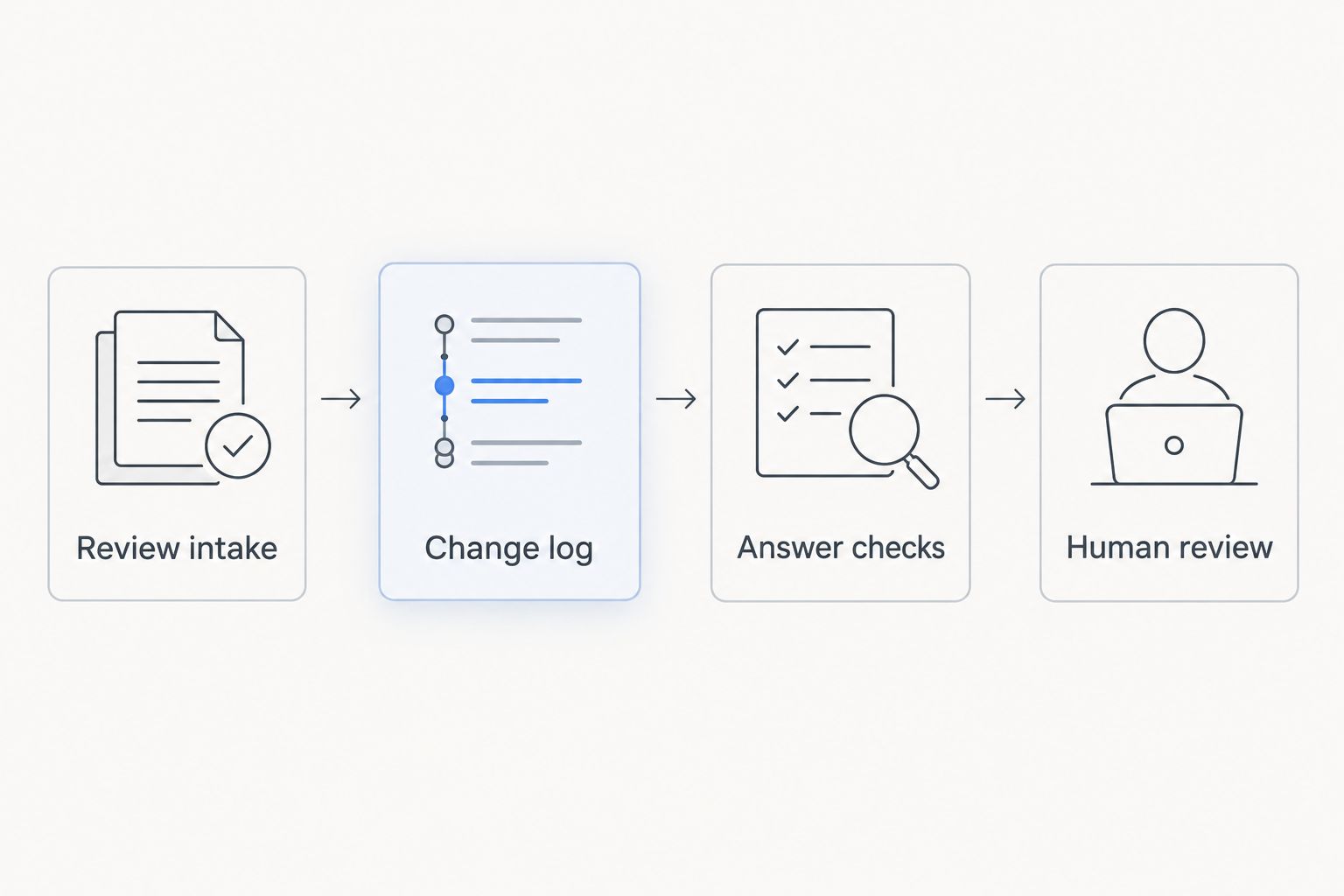
The basic process has four parts: Review intake, Change log, Answer checks, and Human review. Keep each part inspectable before joining the records.
AI-answer monitoring configuration
Review intake does not send information into ChatGPT, Gemini, Perplexity, or Google AI Overviews. It supplies an observation log that you compare with independently collected answers.
- Define prompts. Write buying questions covering your service and location. Keep branded questions separate from unbranded discovery questions; they measure different behavior.
- Fix the context. Record the platform, exact prompt, run date, and any available location, language, account, or model settings. Preserve settings rather than silently changing them between runs.
- Capture answers. Save the returned text and any visible citations through a permitted collection method. If your monitoring service supports scheduled runs or exports, use its documented controls; otherwise maintain a manual baseline.
- Score observable outcomes. Record whether the answer names the brand, describes the service accurately, and cites a relevant source. Use explicit yes, no, or not-assessable states.
- Join by topic and location. Compare review themes with answers about the same service area. Do not match unrelated locations simply because they share a brand name.
- Require evidence for source claims. Record a review as cited only when the answer supplies evidence identifying that review. Similar wording alone does not establish the source.
Expected result: Every visibility observation has a reproducible question, a dated answer, and an inspectable source record where citations exist.
Production Soup's AI-visibility checks belong on the positioning side of this process. They do not turn a Google review into a guaranteed mention or citation.
For 2026 reporting, keep platform results separate. A brand mention in one system is not evidence that the brand appeared in another.
Monitoring whenever an existing review changes
An edited review needs a different treatment from a new review. The review identifier stays central; the changed timestamp tells the collector to inspect the record again.
Configure the same collector to compare updateTime on every successful run. When the timestamp advances, retrieve the current record, apply your permitted retention rules, and create an update event rather than a second new-review event.
Then route the event according to its content:
- Service issue: Send supported operational feedback to the person responsible for that service.
- Changed factual claim: Review whether your published service descriptions need correction.
- Relevant positioning theme: Add the event to the next scheduled answer review without rewriting the baseline prompt.
Do not rerun every prompt after every edit. A comment changing its wording is not evidence that an answer engine has processed the change. Keep the monitoring schedule stable, and label any extra investigation separately.
Expected result: An edited review remains connected to its original record, and the workflow records the change without inflating the number of new reviews.
For a 2026 comparison, distinguish the review's update date from the next answer-check date. That ordering supports investigation, not attribution.
Troubleshooting
The profile is accessible, but the API request fails
Check project approval, enabled APIs, OAuth authorization, and access to the specific location. A browser session that can manage a profile does not prove that the collector's credentials have the same access. Resolve authorization before changing the collection logic.
The same reviews appear as new on every run
Inspect your record key and write operation. Use the account, location, and reviewId together, then update the existing record rather than appending blindly. Confirm that a successful run actually saves its state before the next scheduled execution starts.
Older changed reviews are missing
Check pagination and collection boundaries. Reading only the first response page leaves the collection incomplete when relevant records extend beyond it. Do not advance the last-successful-run marker until the intended collection has finished; otherwise a failed middle page creates a hidden gap.
Ratings arrive without review text
Handle a missing comment as a valid record state. Preserve the rating if permitted, but leave text-derived themes unassigned. Do not ask a language model to invent the customer's reason for choosing that rating.
AI answers change without a matching review event
Inspect the exact prompt, platform, context, answer, and citations. Answer variation does not require a review change. Preserve the observation and investigate its sources; do not manufacture a review-based explanation to make the dashboard look connected.
Customize your workflow
Expand only after the pilot passes its collection and comparison checks. Add locations with separate identifiers and reporting filters. Keep local service questions attached to the appropriate market rather than folding every answer into one brand-wide score.
Best for cross-location analysis: a shared schema with location-level records. The advantage is consistent definitions. The limitation is that a combined report can hide a location's missing data unless collection status remains visible.
Add an owner and next action to each investigated issue. A recurring complaint needs an operational response; an inaccurate public description needs a factual correction. Neither problem is solved merely by collecting more answers.
Production Soup combines films, ads, and AEO/SEO/GEO work. For this workflow, choose the next content task from an observed information gap—not from an assumption that publishing more video automatically changes AI recommendations.
Keep these reporting rules in your 2026 operating document:
- Separate customer feedback, published brand facts, and observed AI answers.
- Label suggested actions as recommendations, not measured outcomes.
- Document prompt changes before comparing results across periods.
- Review retention, access, and downstream processing when the workflow changes.
FAQ
Can I connect Google Business Profile reviews directly to AI monitoring?
You can connect review collection to a monitoring workflow through an API-backed change log. A direct connection depends on your monitoring provider's documented integrations; it is not a universal Google Business Profile feature.
Does connecting reviews make ChatGPT recommend my business?
No. Connecting reviews to your own workflow collects evidence; it does not control ChatGPT's recommendations. Measure brand mentions and citations independently.
What access do I need to retrieve Google Business Profile reviews?
You need authorized access to the relevant profile locations and a Google Cloud project with the required Business Profile API access. Profile management access alone does not establish project-level API access.
How do I detect a Google review that someone edited?
Compare the stored updateTime with the current updateTime for the same account, location, and reviewId. Record a later timestamp as an update event rather than a new review.
Should I use polling or Pub/Sub for review monitoring?
Use scheduled polling for a controlled first implementation. Pub/Sub is an alternative for teams operating event-driven infrastructure, but notifications still require retrieval and recovery logic.
How do I know whether an AI answer used a specific review?
Require source evidence identifying the review. Similar language or a matching topic does not prove that an answer used that review.
Can Production Soup help with AI brand positioning?
Production Soup offers AI-visibility checks that consider SEO, AIO, and GEO. Keep those positioning checks separate from claims about review ingestion or guaranteed citations.
One last thing
An unchanged AI answer can be a useful result. If customer feedback changes but the answer does not, you have an observation to investigate—not a broken integration by definition.
Before expanding, have someone trace one review event and one answer observation from collection through reporting. If they cannot explain the timestamps, location, prompt, and source evidence, fix the record structure first.