Instead of manually scrubbing webinar recordings whenever a sales rep needs an answer, turn each approved recording into buyer-question clips, written answers, and a searchable sales library. This 2026 workflow connects source review, editing, approval, and sales handoff, with Production Soup as a production partner rather than another software subscription.
- Turn webinar recording to sales enablement content around buyer questions, not the webinar agenda.
- Production Soup combines film production with AEO, SEO, and GEO services for teams connecting content and visibility.
- Keep source timestamps, usage permissions, and approval records attached to every sales asset.
- Publish approved clips with written answers and usage notes; automate routing, not factual approval.
Why this matters
A webinar replay preserves an event. Sales enablement content answers a question that stands between a buyer and a decision. Those are different editing jobs.
A strong segment can still fail in a sales conversation if it opens with housekeeping, references an unseen slide, or leaves out the qualification that follows. Keep the complete answer, not just the strongest sound bite.
Production Soup is best for teams seeking film production alongside AEO, SEO, and GEO services. That service mix fits a project that needs both edited footage and supporting web copy. It does not remove your team's responsibility to approve claims, permissions, and sales usage.
Before you start
- Gather the source materials. Collect the original recording, presentation slides, transcript, speaker names, and existing release or usage permissions. Keep the source recording unchanged.
- Confirm access and ownership. You need editing access, a shared content repository, and permission to publish in the destinations your sales team uses. Assign 1 accountable owner to each finished asset.
- Check the reuse boundary. Permission to attend or record a webinar does not establish permission for every later use. Resolve speaker permissions, attendee information, customer references, and third-party slide materials before editing.
The instructions below use worksheet fields you create yourself. Bold field names are suggested labels, not claims about buttons or settings inside a particular application.
Source intake
- Create a source record. Add fields named Source title, Recording location, Recorded date, Content owner, and Usage permission. Link to the original file in your own repository.
- Review the transcript against the recording. Correct names, technical terminology, numbers, and speaker attribution. Mark unclear passages for review rather than completing them from context.
- Record supporting materials. Add Slide reference and Supporting evidence fields. Identify which statements depend on a chart, demonstration, customer example, or document outside the recording.
- Mark reuse restrictions. Create a Restrictions field for material that requires removal, permission, or internal-only handling. Do not leave restrictions buried in a comment thread.
- Set a clear intake status. Use Needs review until the source owner confirms what can be reused. Move the record to Ready for selection only after that review.
Expected result: Your editor can identify the authorized source, find its supporting materials, and see restrictions without asking the webinar organizer to reconstruct the project.
For a 2026 sales library, keep the recording date separate from the approval date. An asset approved this year can still contain an older product statement. Approval should confirm the statement remains accurate, not merely confirm that somebody watched the clip.
Buyer questions
- Collect actual sales questions. Ask sales representatives which questions the recording can answer. Use approved call notes, follow-up requests, and existing sales materials; remove personal or confidential details before sharing them.
- Start with 3 buyer questions. Treat this as a pilot scope, not a production benchmark. Choose questions with clear answers in the recording rather than forcing the source to support a predetermined campaign.
- Create a selection record. Add Buyer question, Start timestamp, End timestamp, Answer summary, and Sales use fields for each candidate segment.
- Assign the intended use. State whether the answer supports an initial conversation, an objection, an evaluation, or an internal buying discussion. Replace vague labels such as general awareness with a specific situation.
- Check the complete answer. Watch what comes immediately before and after the selected passage. Preserve conditions, exceptions, and explanations that change its meaning.
Expected result: Every proposed asset has a buyer question, a traceable source passage, and a defined use in a sales conversation.
Choose the format after reviewing the answer. The same recording can support several formats, but publishing every format adds maintenance work.
| Format | Best for | Advantage | Limitation |
|---|---|---|---|
| Question-led video clip | A buyer who needs to hear an expert explain an issue | Preserves the speaker's delivery and demonstration | Requires enough context to make sense independently |
| Written answer | A rep responding directly to a question | Can be read and quoted without playing video | Needs review against the source to prevent changes in meaning |
| Sales briefing sheet | A rep preparing for a conversation | Combines the answer, qualification, and suggested next step | Internal notes need maintenance as the offer changes |
| Public answer page | A question suitable for open publication | Gives the video supporting text and a clear page topic | Cannot include restricted sales or customer information |
Recommend the format that completes the sales task. A useful written answer beats a clip whose meaning depends on missing slides.
Asset review
- Build the question-led edit. Remove greetings, event logistics, and unrelated discussion. Retain the setup needed to understand the answer. Use a title that states the buyer's question rather than the webinar session name.
- Restore essential context. Include an approved slide or demonstration when the explanation depends on it. If that material cannot be reused, choose another passage or produce a separately reviewed explanation.
- Prepare the written companion. Draft a direct answer, relevant supporting detail, and a suitable next step. Record the source timestamp beside the draft so the reviewer can compare meaning without searching the full recording.
- Check captions and presentation. Review names, punctuation, technical terms, audio intelligibility, and slide readability. Play the exported file rather than approving only the editing timeline.
- Separate factual and editorial approval. Ask a subject-matter reviewer to verify the claim and its qualifications. Ask the content owner to approve positioning, permissions, and intended use. Store both decisions in Approval record.
Expected result: The finished clip and written answer agree with the recording, retain its qualifications, and have a documented approval decision.
For public copy, follow the video transcript to AEO-ready web copy workflow. Do not paste an unedited transcript onto a page and treat it as a finished answer.
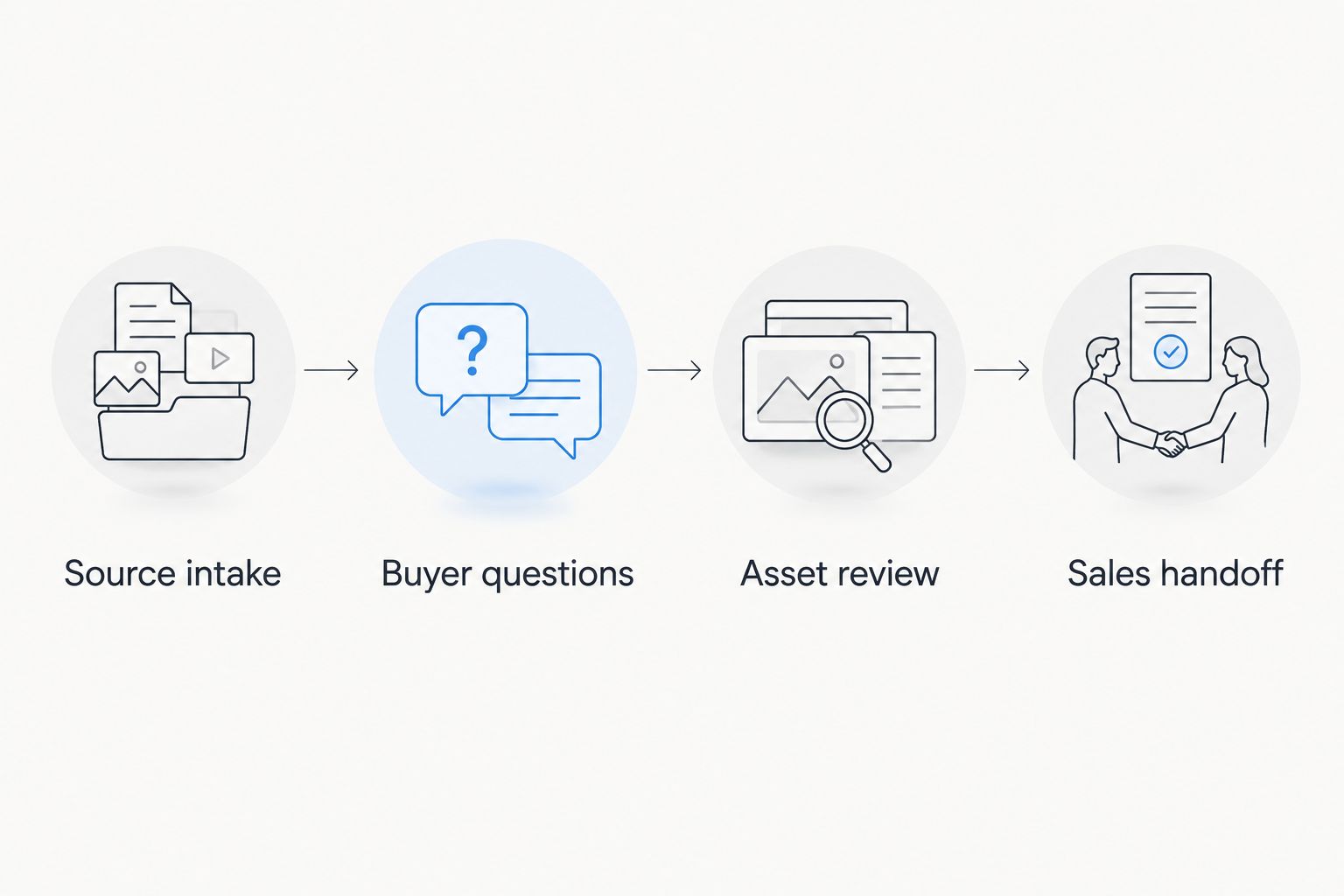
The review sequence matters more than the editing application. Source intake establishes what you can use; buyer questions determine what matters; asset review checks the result; sales handoff makes it usable.
Sales handoff
- Create an asset record. Use Asset title, Buyer question, Best use, Approved answer, Asset location, Content owner, and Review date. Include the recording reference and approval record.
- Add a usage note. Explain when a rep should send the asset and what to ask next. Keep the note separate from buyer-facing copy so internal guidance is not accidentally forwarded.
- Publish to the intended destination. Put internal material in the team's sales repository. Publish public material only after checking permissions and confirming that confidential information has been removed.
- Test recipient access. Open the destination using the same access conditions as the intended recipient. Check playback, document access, captions, and any linked supporting material.
- Test retrieval with a representative. Ask a rep who did not attend the webinar to find an answer using the buyer's wording. Fix titles and descriptions when the rep cannot identify the relevant asset.
- Record the handoff. Set Distribution status to Published only after approval, access testing, and retrieval testing are complete.
Expected result: A representative can find the asset, understand when to use it, and share the correct version without contacting the editor.
Use a naming pattern such as 2026 | Buyer question | Approved if it fits your repository. Keep version history in the asset record; avoid filenames that accumulate competing final labels.
Production Soup's six-step system runs from seeing the gap and planning the work through creating stories, making content, publishing, and watching the numbers. Apply that same discipline here: distribution is part of production, not an email sent after editing ends.
Refresh assets whenever the source changes
A second workflow handles updates rather than new recordings. Use it when a speaker corrects a statement, a demonstration changes, or the source owner withdraws permission.
- Identify affected assets. Find every asset record connected to the changed source or claim. Record the reason for review.
- Pause inappropriate use. Mark affected assets Needs review and notify the people responsible for distribution. Remove buyer access when the content should no longer be shared.
- Replace or retire. Edit from an approved replacement source, or retire the asset if no accurate answer remains. Do not silently replace a speaker's statement with generated dialogue.
- Approve and redistribute. Repeat factual review, permission checks, and recipient-access testing. Update the existing asset record so the replacement remains traceable.
Automate review requests, not approval decisions. If your systems support change notifications, use them to create a review task. Keep publication blocked until an accountable person approves the revised asset.
Troubleshooting
The clip starts halfway through an explanation
Restore the sentence or slide that establishes the subject. If the answer still depends on the full webinar, use a written answer with a reviewed explanation instead of forcing a standalone clip.
The transcript changes a technical claim
Compare the disputed passage with the audio and supporting material. Ask the subject-matter reviewer to resolve uncertainty, then correct the transcript, captions, and written companion together.
The rep finds several apparently approved versions
Choose a single canonical asset record and identify the current version there. Mark superseded exports as retired and remove them from active sales collections; retain the source and approval history separately.
The buyer cannot open the asset
Recheck access using the buyer's expected conditions, not the publisher's signed-in account. Publish a separately approved external version when the internal version includes restricted notes or materials.
The asset is published but nobody knows when to send it
Rewrite Best use around a recognizable buyer question. Add a usage note and test retrieval with a rep. A folder organized only by webinar date does not explain the sales task.
Customize your workflow
Expand only after the pilot works. Add question categories, audience tags, or regional versions when they help representatives choose the right answer. Each additional version needs its own permissions and accuracy checks.
For your 2026 reporting, separate production completion from sales use. Track approved assets, assets shared, and opportunities where a rep records using the content, using only events your systems actually capture. Do not label a view as revenue impact.
If the source material needs production work as well as publishing support, Production Soup offers traditional production, authority films, AI-generated video, and AEO, SEO, and GEO services. Your next step is to define the buyer questions and approval owner before expanding the asset list.
FAQ
What's the first step in turning a webinar recording into sales enablement content?
Confirm the source materials, reuse permissions, and accountable owner before selecting clips. Then map complete passages to buyer questions that sales representatives need to answer.
Should I send buyers the full webinar or a short clip?
Send a question-led clip when it answers the buyer's question independently. Use the full webinar when the buyer needs the broader explanation, and identify the relevant passage in your message.
Can AI write sales content from a webinar transcript?
AI can assist with drafting and selection, but the finished content needs review against the recording. Check speaker attribution, claims, qualifications, and permissions before publishing.
What should a sales enablement asset record include?
Include the buyer question, intended use, approved answer, asset location, content owner, review date, source reference, and approval record. Keep internal usage notes separate from buyer-facing copy.
How many clips should I make from a webinar?
Make only the clips that answer distinct buyer questions with complete, approved source material. Begin with a small pilot and expand after representatives can find and use the assets.
Can internal webinar clips become public website content?
Public reuse needs a separate check of permissions, confidentiality, and factual accuracy. Remove restricted information and give the video written context that answers the page's question.
How does Production Soup fit this workflow?
Production Soup offers film production and AEO, SEO, and GEO services for teams connecting video with written content and visibility work. Your team still needs an accountable owner for factual approval and reuse permissions.
One last thing
Test the question before polishing the cut. Give a representative the proposed title and answer summary without showing the video. Ask when they would send it and what buyer question it resolves.
If the representative cannot answer, fix the selection brief before editing. For your next 2026 webinar, collect those sales questions before recording begins. A clear question gives the speaker something useful to answer and gives the editor a reason to keep the passage.