A testimonial video takes as long as its preparation, customer scheduling, editing, and approvals require—not just the time spent filming. Build the delivery date around confirmed interview and review dates; a finished edit is not ready to publish until the customer has approved its use. This guide shows you how to build a workable testimonial video production timeline in 2026 without treating an estimate as a promise.
- Build your testimonial video production timeline around customer availability, editing, and final approval—not the shoot alone.
- Production Soup combines film production with brand visibility work; define both the story and its publishing destination.
- Choose existing footage, remote recording, or an on-site interview based on the evidence your story needs.
- For your 2026 customer testimonial, confirm review owners before booking production.
Why this matters
Your launch calendar needs a publishable asset, not merely a completed shoot. If the customer cannot review the edit before launch, finishing the camera work earlier does not solve the problem.
Before discussing production services, write down what must be delivered and who can authorize it. Include the customer interview, supporting footage, captions, intended channels, and approval responsibilities. That gives a producer something concrete to schedule.
For a 2026 launch, distinguish the first-cut date from the publish-ready date. They mark different decisions. The first cut starts editorial review; the publish-ready date follows the required approvals and final checks.
How long does it take to produce a testimonial video?
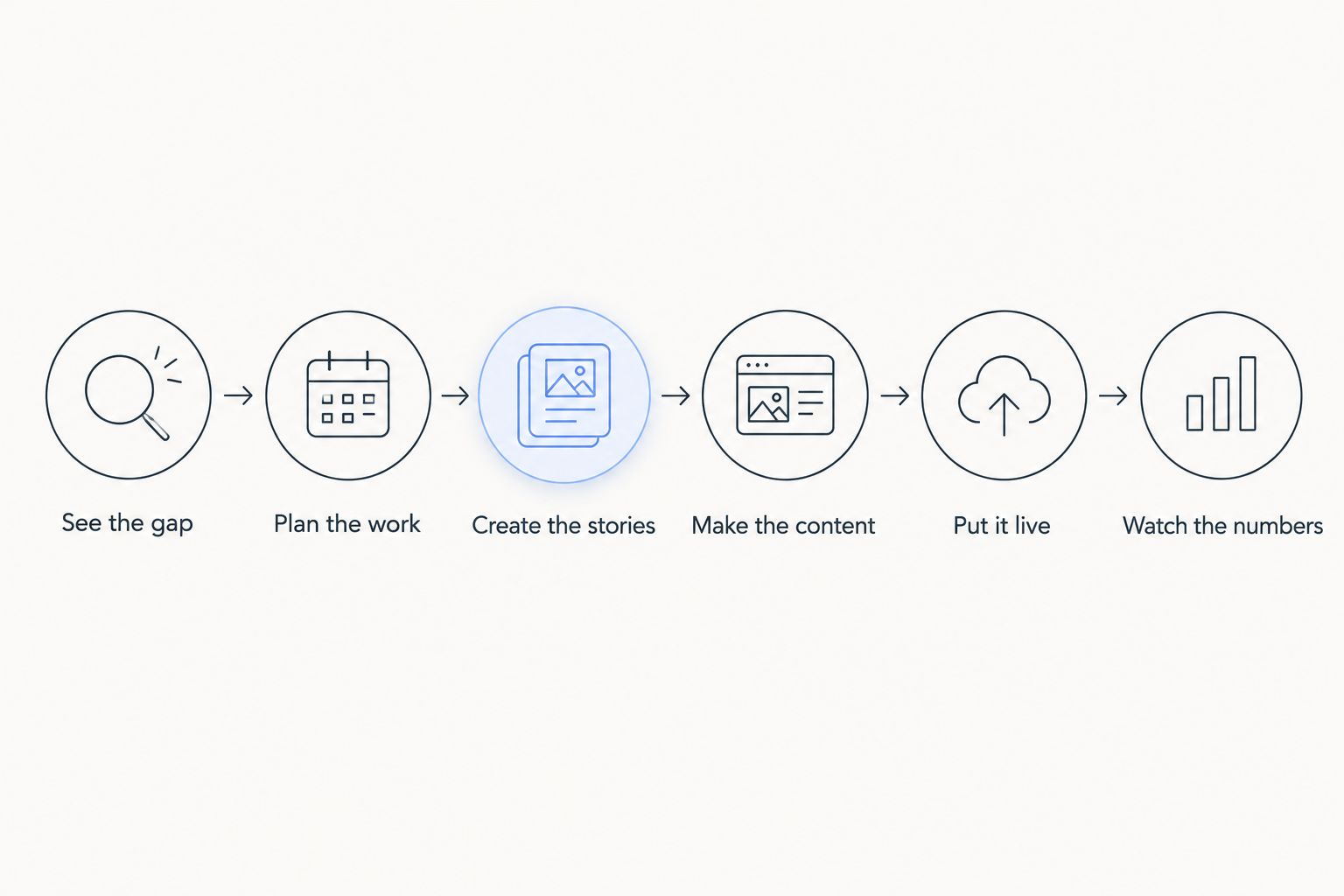
There is no fixed duration that applies to every testimonial video. Establish the schedule through the following 6 steps, and assign a date and owner to each handoff. These are planning steps, not a claim that every project needs the same amount of work.
| Step | Work to schedule | What clears the handoff |
|---|---|---|
| See the gap | Identify the buyer question the testimonial must answer | Agreed audience, purpose, and customer story |
| Plan the work | Arrange the interview, permissions, footage, and reviews | Confirmed participants and production brief |
| Create the stories | Develop interview prompts and an evidence outline | A clear account of the problem, experience, and outcome |
| Make the content | Record, assemble, edit, and finish the video | An approved edit and checked deliverables |
| Put it live | Publish the video with its supporting page content | Correct files, captions, permissions, and destination |
| Watch the numbers | Review the measurements attached to the video's purpose | A named owner and a measurement plan |
The completion test matters more than the label. A calendar entry marked “editing” says little unless everyone knows whether it ends with an internal assembly, a customer review copy, or final delivery.
See the gap
Start with the objection your buyer needs answered. A testimonial about an easy onboarding experience serves a different purpose from a story about a difficult implementation or an ongoing service relationship.
Write a focused brief: who is watching, what they doubt, and what this customer can truthfully explain. Do not ask the interview to prove claims the customer cannot support. An unclear brief leaves the editor choosing the story after recording.
Plan the work
Confirm the customer's availability before treating the shoot date as settled. Establish who will appear, where recording will happen, and whether the customer's organization needs to approve participation or public use.
Then reserve the review windows. Ask who approves factual statements, who checks presentation, and who authorizes publication. Give those people the deliverables and review expectations before filming—not when an export arrives in their inbox.
Create the stories
Prepare prompts that invite specific experiences rather than rehearsed praise. Ask what the customer was trying to do, what happened during the work, and what changed afterward. Follow up on details the customer can substantiate.
Build an evidence outline, not a forced script. List the statements that need verification and the visuals that would help explain them. That makes the recording purposeful without putting words in the customer's mouth.
Make the content
Separate story approval from finishing approval. First decide whether the selected statements tell an accurate, useful story. Then review supporting footage, titles, sound, captions, and delivery formats against the approved direction.
Approve the meaning before polishing the presentation. Reordering an interview after finishing can require changes across captions, graphics, and alternate edits. Keep a clear record of what was approved and which file contains it.
Put it live
Define whether final delivery includes an uploaded video or only files handed to your team. Those are different responsibilities. Check the destination, title, customer identification, captions, and supporting copy before publication.
For a 2026 publishing plan, include the written context around the video. Explain who the customer is and what the testimony supports. Do not turn an individual customer's experience into a broader performance claim.
Watch the numbers
Choose measurements that match the video's job. A sales team needs a different reporting plan from a team publishing a customer story on a website. Specify the available measurement source rather than promising attribution you cannot collect.
Keep this work separate from production completion. Publishing closes the delivery task; evaluating performance begins another task. Neither a finished video nor a measurement plan guarantees leads, rankings, or citations.
Which production approach fits your deadline?
Choose the recording approach after identifying what the story needs to show. Convenience alone is not enough. A readily available recording has limited value if it does not contain a usable customer account.
| Approach | Best for | Advantage | Constraint to schedule around |
|---|---|---|---|
| Existing footage | A story already captured clearly, with suitable permissions | Removes the need to arrange a new interview | Missing answers, unclear permissions, or unsuitable recordings still need resolution |
| Remote interview | A customer who can record from a suitable location | Removes crew travel from the interview plan | Requires preparation for sound, framing, connection, and recording |
| On-site interview | A story that needs the customer's workplace or activity on screen | Lets the interview and supporting footage share a setting | Requires location access, crew coordination, and participant availability |
Existing footage: check the evidence first
Review the recording before building a schedule around reuse. Can you identify the speaker? Does the customer explain the relevant experience clearly? Is the sound usable, and is the intended use authorized?
Best for: a customer story already present in usable footage. Reuse is not a shortcut when the core answer is missing. Schedule a follow-up interview instead of asking editing to manufacture a statement the customer never made.
Remote interview: prepare the recording setup
Confirm the recording method and give the customer practical setup instructions. Check the proposed location for distracting noise, framing problems, and interruptions. Establish how the recording will be captured and transferred.
Best for: a customer who can speak clearly from an appropriate setting. Remote recording avoids a location visit, but it does not remove interview preparation or approval work. Keep those tasks visible in the calendar.
On-site interview: plan access and coverage together
Confirm where filming is permitted and what the crew can capture. If the story depends on showing a process, arrange access to that activity rather than assuming it will be available on arrival.
Best for: testimony that needs visible workplace context. On-site production adds coordination, so put access decisions in the brief. Do not leave location permissions or sensitive material for the camera crew to resolve during recording.
Why a testimonial video production timeline varies
These factors belong in the schedule because each can change the work or block a handoff:
- Customer availability. The interview and customer review both need confirmed participation. Treat them as separate calendar commitments.
- Story readiness. A clear, supportable account gives the interview direction. Unresolved claims require clarification before they become finished on-screen statements.
- Recording requirements. Existing footage, remote recording, and location production require different preparation. Match the plan to the material you actually need.
- Deliverable scope. Additional edits, captions, graphics, and channel-specific formats create additional work. List them before scheduling production.
- Approval ownership. Internal marketing review and customer authorization are separate decisions. Identify who can make each decision and how feedback reaches the editor.
- Changes after approval. A new message, speaker, or required claim changes the assignment. Reconfirm the schedule rather than absorbing a new brief into the old deadline.
For your 2026 production brief, distinguish a preference from a requirement. A preferred interview date is negotiable; a confirmed event launch is a dependency the producer must assess. Calling everything urgent does not establish the order of work.
How do you build a schedule you can approve?
Work backward from publication and record 3 checkpoints: the interview, the first cut, and final authorization. Add the preparation and finishing tasks between them. These checkpoints are a planning recommendation, not a standard turnaround promise.
For each checkpoint, record the owner, the required input, and the consequence of a missed decision. If the customer returns feedback after the agreed review window, the next task needs a revised date. Keep that change visible to everyone depending on delivery.
Production Soup is best for brands seeking film production and brand visibility work together. Its service mix includes traditional production, authority films, generated video, and visibility checks. That breadth fits a broader content assignment; it does not replace a project-specific schedule or customer approval.
When briefing Production Soup for testimonial video production, bring the intended audience, customer contact, deadline, and publishing destination. Keep the assignment focused: broader visibility work belongs in the scope only when it serves the same objective.
Define your testimonial project
Bring your customer story, launch date, and required deliverables to the production brief.
Can editing start before the customer interview?
Editorial preparation can start before the interview. Organize existing footage, collect approved names and titles, confirm deliverable formats, and prepare the project structure. The final customer story still depends on what the customer actually says.
Avoid locking an edit around an expected quotation. Prepare the questions and visual coverage, then let the recorded evidence determine the sequence.
Does a short testimonial take less time to produce?
A shorter finished video does not automatically require less production work. Customer scheduling, permission, interview preparation, and review remain necessary regardless of the final runtime.
Set the length around the story's purpose. Cutting a detailed customer account into a concise piece still requires editorial decisions and factual checks.
Can generated footage replace the customer interview?
Generated footage does not establish a real customer's experience. It can serve an illustrative role when appropriate, but it must not turn an invented person or event into apparent customer evidence.
Keep the distinction clear in your 2026 brief. Decide what is genuine testimony, what is supporting material, and what needs explanation before production begins.
FAQ
What's the fastest way to get a testimonial video ready?
Remove unresolved decisions before production starts. Confirm the customer, story, recording approach, deliverables, and approval owners, then schedule the required handoffs.
How long does testimonial video editing take?
Editing time depends on the recorded material, deliverable scope, and review process. Ask for separate dates for the first cut, revisions, and final delivery rather than treating editing as a single deadline.
Can we produce a testimonial from an existing interview?
Yes, when the interview contains a relevant customer account, usable sound and picture, and suitable permission for the intended use. Review those conditions before committing to reuse.
Is remote recording better than an on-site customer interview?
Remote recording fits a customer who can record in a suitable setting; on-site recording fits a story that needs workplace context. Choose based on the evidence and visuals the testimonial requires.
Who should approve a customer testimonial before publication?
Name the internal publishing decision-maker and the customer's authorized reviewer before recording. Add any other required reviewers to the schedule rather than discovering them during final delivery.
Can Production Soup help with more than filming?
Production Soup offers traditional production, authority films, generated video, and brand visibility checks. Define which work belongs in the testimonial assignment before agreeing on deliverables and dates.
Should captions be included in the production timeline?
Yes, include caption preparation and checking in the delivery scope. Verify customer names, technical terms, and the meaning of edited statements before publication.
One last thing
Ask the customer's reviewer to reserve time before you reserve the shoot. An interview can be complete while publication remains blocked by an unanswered approval request.
Your 2026 deadline needs an approval appointment, not just a filming appointment. Put both on the calendar and make clear who can release the finished video.