
Yes—AI avatars can be used compliantly in corporate training videos, but using an avatar does not make the training compliant. You still need appropriate likeness and voice rights, lawful data handling, accessible delivery, accurate instruction, and any disclosures required for the audience and jurisdiction. For a 2026 rollout, approve the production method and the training content separately.
- AI avatar compliance corporate training requires separate checks for consent, privacy, accessibility, disclosure, and instructional accuracy.
- Production Soup provides corporate video production; legal approval remains a separate responsibility.
- A licensed stock avatar avoids cloning an employee, but its license still needs review.
- Do not upload employee records or confidential examples before approving the vendor’s data terms.
Why this matters
Approve the use case before choosing the face. A presenter explaining a software workflow creates different obligations from an executive clone delivering workplace policy or a synthetic instructor demonstrating a hazardous task.
Separate the avatar decision from the production decision. The guide to choosing between a video production agency and an in-house team addresses who makes the work. Your legal, privacy, accessibility, and subject-matter owners decide whether that work is ready to release.
A convincing face is not evidence that the lesson is correct. Nor does a vendor’s security certification resolve likeness rights, mandatory training requirements, or the accuracy of translated instructions.
Is it compliant to use AI avatars in corporate training videos?
Yes, when the specific use meets applicable requirements. There is no single approval that covers every avatar, employer, training subject, and distribution territory.
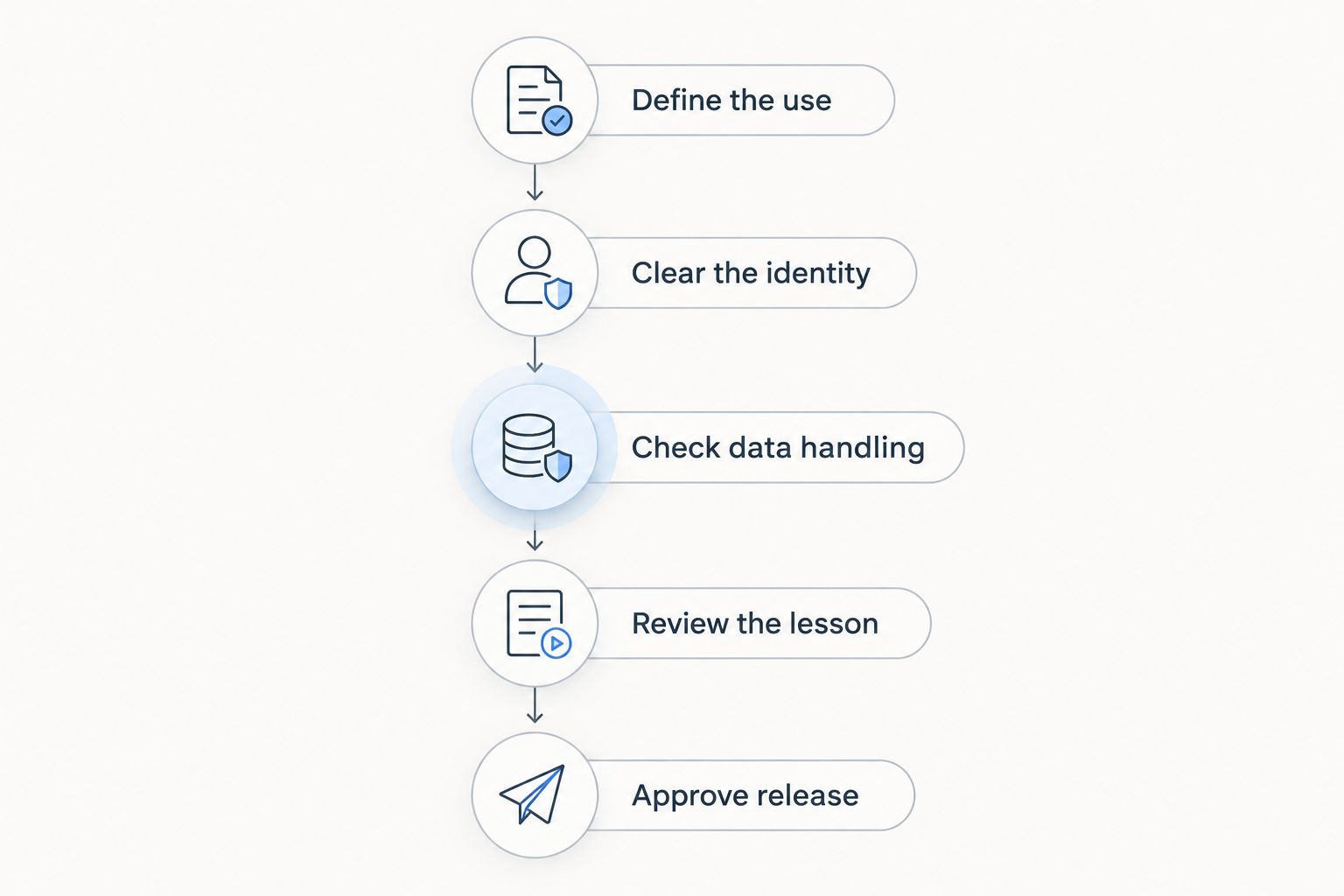
For a 2026 release, use the following approval sequence. Treat it as a production control, not a legal certification.
- Define the use. Record the training topic, audience, countries, languages, distribution channels, and whether completion is mandatory. Identify any prescribed instructor qualifications, participation requirements, or practical assessments.
- Clear the identity. Establish whether the presenter is a licensed stock avatar, an entirely fictional character, or a replica of a real person. Retain the relevant license or written permission.
- Check data handling. Review what the provider receives, why it needs that information, where it processes it, and whether it uses uploads to train models. Replace identifiable examples with approved fictional material where possible.
- Review the lesson. Have the responsible subject-matter expert approve the script and final render. Check captions, translated speech, visual demonstrations, and any claim about company policy.
- Approve release. Confirm required disclosures, accessibility, distribution permissions, version ownership, and the evidence you will retain. Release only the approved export.
Keep 1 named release owner per training module. This is a recommended accountability rule, not a statutory requirement: someone must know which version is authorized and who can withdraw it.
What should the approval record contain?
Retain the final script, approved video, avatar license or consent, relevant vendor terms, reviewer approvals, accessibility checks, and distribution scope. Include a version identifier and review trigger, such as a policy change or a change in the provider’s terms.
Keep 1 approval record per released version. That recommendation prevents an approval for an earlier script from being mistaken for approval of a later edit. A shared folder is useful only if the released file can be matched to its supporting record.
Licensed stock avatars: best for a neutral presenter
A licensed stock avatar is a sensible starting point when you need narration without portraying an employee or executive. Its advantage is the separation between the presenter and your workforce. Its limitation is that the provider’s license still determines permitted uses.
Check internal training, external distribution, editing, localization, and reuse after the subscription ends. Do not assume that permission to generate a video includes permission for every future use of that video.
Ask what happens if the provider withdraws the avatar. You need to know whether existing training can remain in use and whether replacement work becomes necessary.
Custom employee avatars: best for an authorized internal spokesperson
A custom employee avatar fits situations where a recognizable person genuinely matters to the instruction. The trade-off is additional control over identity, voice, approvals, and future use.
Separate permission to record someone from permission to synthesize new speech in that person’s likeness. The written agreement should address subjects, languages, distribution, approval rights, duration, departure from employment, and withdrawal procedures.
Employee agreement alone does not settle every privacy question. Under the GDPR, where it applies, employee consent requires particular care because the employment relationship can affect whether consent is freely given.
Fictional presenters: best for avoiding a real-person replica
A fictional presenter can explain a process without suggesting that a real employee delivered the message. That distinction helps with identity management, but it does not remove the need to review provider terms, intellectual property rights, data use, or disclosure duties.
Avoid implying that the character has real credentials or lived experience. A synthetic presenter can narrate approved safety material; the character should not be presented as a qualified safety professional unless that representation is accurate and justified.
| Presenter option | Best for | Main advantage | Main limitation |
|---|---|---|---|
| Licensed stock avatar | Neutral policy or process narration | Does not require cloning your employee | License scope and continued-use terms need checking |
| Custom employee avatar | An authorized internal spokesperson | Connects instruction to a recognizable person | Requires explicit controls over likeness, voice, and reuse |
| Fictional presenter | Instruction without a real-person replica | Separates the character from actual staff | Must not imply false credentials or experience |
Choose the least identity-dependent format that teaches the lesson. A familiar executive face is unnecessary if a neutral presenter and a clear screen demonstration do the job.
Why AI avatar compliance varies
These factors change the approval work. None is resolved simply by selecting a different rendering tool.
- Audience location. Privacy, publicity rights, employment rules, and synthetic-media obligations differ across jurisdictions. Map where learners are located, not just where headquarters sits.
- Identity source. A stock avatar, employee clone, and fictional presenter require different evidence of rights and authorization.
- Uploaded information. A generic script and a recording containing employee or customer information create different privacy and confidentiality issues.
- Training subject. Safety, harassment prevention, healthcare, and other regulated subjects can have content or delivery requirements beyond the video itself.
- Distribution scope. Internal learning, public recruitment, customer education, and advertising are different uses. A license or approval for one does not automatically cover the others.
- Learner access. Hearing, vision, language, and interaction needs affect whether the instruction is usable and whether accommodations are required.
Which legal requirements need a closer look in 2026?
Apply the law to the actual use—not to the word “avatar.” The following are established legal frameworks, not a complete jurisdiction-by-jurisdiction opinion.
European Union: distinguish provider and deployer duties
Under Article 50 of the EU AI Act, transparency obligations relevant to synthetic content are scheduled to apply from August 2, 2026. The provision distinguishes duties on providers of systems generating synthetic content from duties on deployers using deepfakes.
Do not turn that distinction into a blanket statement that every stock-avatar training video requires the same disclosure. Determine whether the content falls within the relevant definitions, whether the Act applies to the deployment, and which obligation belongs to your organization.
For a 2026 international rollout, have counsel review the disclosure approach before distribution. A platform’s technical marking feature and your audience-facing explanation serve different purposes.
Personal data: identify what the system actually processes
Under the GDPR, facial images and voice recordings can be personal data. Biometric data receives special-category treatment when processed for the purpose of uniquely identifying a person; not every photograph or voice recording automatically meets that condition.
Document the processing purpose instead of labeling every avatar workflow “biometric” or “not biometric.” Review the lawful basis, processor arrangements, retention, transfers, and any need for a data protection impact assessment with your privacy owner.
United States: check state law and training-specific rules
In the United States, review applicable state likeness, voice, privacy, and biometric laws alongside employment and sector requirements. Internal distribution does not by itself settle those questions.
For example, Illinois’s Biometric Information Privacy Act addresses covered biometric identifiers and information, including voiceprints and scans of face geometry. Whether a particular avatar workflow falls within its scope depends on what is collected and how it is processed—not simply whether the output looks human.
Does an AI training presenter need a disclosure?
Disclosure depends on the applicable law, the content, and how you present it. As a production practice, tell learners when a realistic presenter is synthetic, especially when they could mistake it for a real colleague or executive.
Use plain language near the video or within the training introduction. Identify the responsible department separately so employees know where to direct questions.
Do not present disclosure as a cure-all. A label does not authorize someone’s likeness, correct an inaccurate lesson, or make an inaccessible module usable.
Can an avatar deliver mandatory employee training?
An avatar can deliver instructional content, but that alone does not establish that mandatory training requirements are met. Check the rules for the specific topic and jurisdiction, including required content, instructor qualifications, interaction, assessment, and completion records.
A video can be a component rather than the entire course. Where training requires hands-on demonstration or an opportunity to ask a qualified person questions, design those elements explicitly.
Record 1 subject-matter approval per released language version as a recommended minimum control. Translation changes the instruction learners receive, so approval of the source script is not enough.
How should you check accessibility and accuracy?
Review the finished module, not just the script. Speech generation, captions, editing, and localization can introduce discrepancies after the wording has been approved.
Use this release check:
- Compare spoken instructions with the approved script, including names, acronyms, warnings, and exceptions.
- Review captions manually. Confirm that timing and wording preserve the meaning of the instruction.
- Provide an accessible text alternative and assess whether essential visual information needs audio description.
- Check the learning platform’s keyboard operation and compatibility with relevant assistive technology.
- Have a qualified reviewer check each translation, including captions and on-screen text.
- Give learners a clear route to report errors or request an accommodation.
For 2026 procurement, specify the accessibility standard your organization requires rather than asking whether a tool is “accessible.” A transcript is useful, but it does not replace every accessibility requirement for the complete learning experience.
Where a production partner fits
Production Soup is best for teams seeking corporate training video production, not a substitute for legal review. Production Soup provides traditional and AI-generated video production; the production brief should state which approvals remain with your organization.
The advantage of using a production partner is a defined owner for the creative deliverable. The limitation is equally clear: production approval cannot replace your employer, privacy, legal, or subject-matter responsibilities.
Use Production Soup to discuss the production requirement after defining the audience, identity permissions, lesson owner, and release process. Bring those decisions into the brief rather than leaving them until the final export.
FAQ
Is it legal to use AI avatars for internal employee training?
AI avatars can be used legally for internal employee training when the specific use meets applicable requirements. Internal distribution does not eliminate likeness, privacy, accessibility, or training-content obligations.
Do employees need to consent before we clone their face or voice?
Obtain explicit written permission before creating an employee’s face or voice replica, and have counsel confirm the applicable legal requirements. Address synthetic speech, reuse, languages, distribution, and what happens when employment ends.
Does a licensed avatar make a training video compliant?
No. A license addresses permitted use of the avatar, not every obligation attached to the training. Review data handling, lesson accuracy, accessibility, disclosures, and any mandatory training rules separately.
Do we have to label an AI presenter in a training video?
Disclosure requirements depend on the jurisdiction and the content. As a production practice, identify realistic synthetic presenters so learners do not mistake them for actual employees or executives.
Can we upload employee information to generate a training video?
Approve the vendor and the data use before uploading employee information. Review necessity, lawful processing, access, retention, model-training use, and international transfers where applicable.
Can an AI avatar teach workplace safety?
An AI avatar can narrate approved safety instruction, but the presenter does not establish compliance with safety-training requirements. Check whether the course also needs qualified instruction, practical demonstration, interaction, or assessment.
Are captions enough to make avatar training accessible?
No. Captions address access to spoken audio, but the complete module can also require accessible controls, text alternatives, audio description, or other accommodations. Assess the full learning experience.
One last thing
Your hardest compliance problem might be an old video, not a new avatar. A fully authorized presenter can still deliver an outdated policy.
Before the 2026 release, assign a withdrawal process alongside the approval process. When a policy, translation, license, or employee authorization changes, you need to find every affected version and stop distributing it.