Instead of manually mining booth recordings for posts, use this 2026 workflow to turn trade show footage into verified answers, publish them beside the video, and check whether AI search cites the source. The path from trade show footage to AI search citations starts with useful evidence—not a highlight reel or a guaranteed placement.
- Trade show footage to AI search citations requires verified answers, accessible source pages, and citation checks—not just uploaded video.
- Production Soup combines film production and AI-visibility checks for brands connecting event content with search.
- Publish buyer answers beside the footage, with speaker context and evidence for each factual claim.
- Track linked citations separately from brand mentions; neither proves the video caused the result.
Why this matters
A booth interview often contains the answer a buyer needs. The finished recap often removes it. Music, crowd shots, and short reactions tell people an event happened; they rarely explain a technical limitation or buying decision.
Your job is to preserve the answer and give it a useful home. A public page with readable text gives search systems a source to retrieve, although publication does not guarantee indexing or citation.
Production Soup is best for brands seeking film production and AI-visibility checks from one creative agency. That scope connects content creation with visibility review; it does not promise that an assistant will cite your footage. Start with Production Soup if you need that combined service rather than a standalone editing tool.
Before you start
- Gather the source material and permissions. Collect original recordings, audio, speaker names, approved job titles, demonstration notes, and permission to publish the relevant footage and statements. Check organizer restrictions and background material before editing.
- Confirm publishing and measurement access. You need an editor or transcription process, access to your website's publishing system, and permission to inspect the published page in Google Search Console. Choose who approves technical claims and who owns publication.
- Resolve the event-only claim trap. A demonstration can depend on a prototype, controlled conditions, or an unreleased feature. Confirm what the footage actually establishes before turning spoken remarks into general product claims.
Choose one narrow buyer question for the first pass. Expanding every recording into a separate page creates review work before you know which clips contain useful answers.
Source record setup
Build the record before editing. This is a tool-independent workflow: the bold labels below are fields you create in your working document, not buttons in a particular application.
Create the evidence record
- Assign a source ID. Give each recording a stable identifier. Record the event name, recording date, speaker identity, and permission status alongside it.
- Transcribe the relevant discussion. Preserve timestamps and speaker changes. Listen again wherever booth noise, overlapping voices, or technical vocabulary makes the transcript uncertain.
- Create a claim ledger. Add fields named Buyer question, Source timestamp, Exact statement, Supporting evidence, Reviewer, and Approval status. Keep quotations separate from paraphrases.
- Resolve ambiguous language. Replace unclear references such as “this system” only after confirming what the speaker meant. Do not convert a casual estimate into a verified specification.
Expected result: An editor can trace each proposed answer back to the recording, identify its reviewer, and see whether it is approved for publication.
Select the useful answer
- Write the question in buyer language. Use a question the recording actually answers, such as how a process works or what conditions a demonstration requires.
- Draft the direct answer first. State the conclusion, then explain its conditions and limitations. Remove greetings, repeated phrases, and event chatter without changing the meaning.
- Check every factual addition. Verify any detail added during editing against approved material. A transcription or writing tool is not evidence for a claim missing from the recording.
- Separate footage from proof. Crowd reactions show attention, not product performance. A demonstration shows what happened under its recorded conditions, not every possible use case.
For your 2026 event archive, use the recording date to distinguish current statements from material that needs renewed approval. Do not change the date simply to make an old demonstration look current.
Expected result: You have an approved answer with a clear question, a source timestamp, and boundaries that survive being quoted outside the event context.
Answer page configuration
Choose the destination before cutting every social format. The page should solve a buyer's problem even if the visitor never presses play.
Choose the page format
Use the following comparison to select the first deliverable. These are editorial choices, not claims that one format guarantees search visibility.
| Format | Best for | Advantage | Limitation |
|---|---|---|---|
| Question-led page | A specific buyer decision | Keeps the answer and evidence together | Requires enough substance to justify a separate page |
| Event recap | Event context and several related moments | Explains what happened and who participated | Can bury individual answers inside a broad story |
| Video landing page | Watching a complete interview or demonstration | Keeps the recording central | Needs readable supporting text to stand alone |
Choose a question-led page when the recording answers a distinct buyer question. Use an event recap when the event itself is the subject. Avoid separate pages that repeat substantially the same answer.
Build the source page
- Write a descriptive title. Name the question or subject. Include the event context only when it helps explain the evidence.
- Place the answer near the top. Identify the relevant organization, speaker, and topic in plain language. Follow with the process, constraints, and supporting detail.
- Add the relevant video segment. Make the clip match the written answer. Keep enough lead-in and follow-through to preserve qualifications and context.
- Publish readable supporting text. Include an edited transcript or useful transcript excerpts. Correct transcription errors and mark omissions without creating a statement the speaker never made.
- Add source context. State when and where the material was recorded, who reviewed the technical explanation, and what the demonstration does not establish.
Use the video transcript to AEO-ready web copy workflow when the main challenge is turning spoken material into a clear written answer.
Expected result: A visitor can understand the answer, assess its source, and find the relevant footage without reconstructing the entire event.
The publication sequence is simple: source approval comes before the answer page; access checks come before citation monitoring. Reversing that order leaves you measuring a page that is not ready.
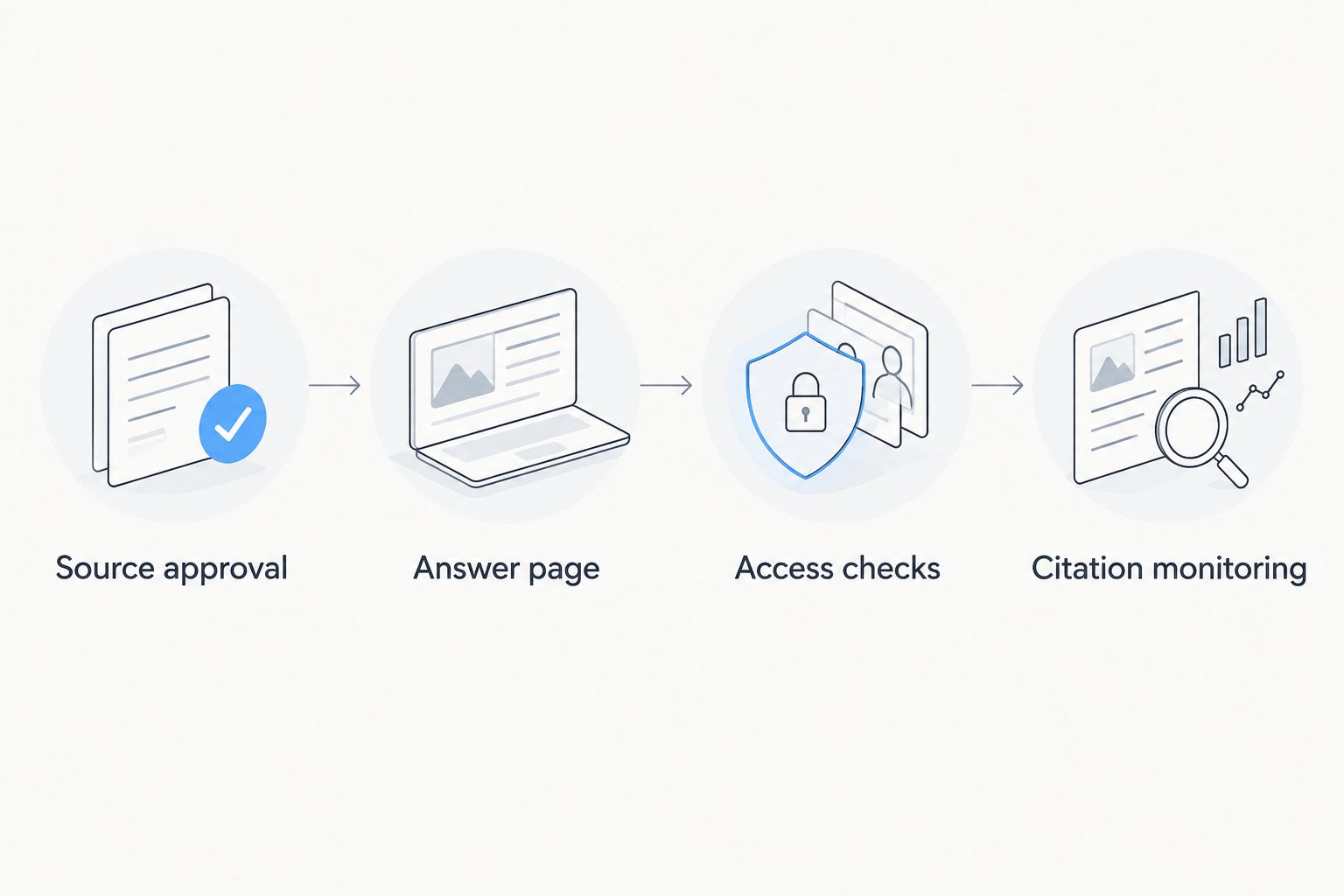
Publication and citation monitoring
A published page, a search impression, a brand mention, and a linked citation are different observations. Keep them separate in your 2026 reporting.
Verify the public page
- Open the page without signing in. Confirm that the answer, speaker context, and supporting text are visible. Check the video separately; a working page can still contain a broken embed.
- Review indexing controls. Confirm that the page is not unintentionally excluded by a noindex directive, authentication, or crawler restrictions. Ask the website owner to resolve conflicts rather than changing sitewide rules blindly.
- Inspect the URL in Search Console. Use URL inspection for the published address and review the reported indexing information. Search Console describes Google's access and indexing status; it does not certify visibility in other assistants.
- Record the publication state. Save the public address, publication date, approved answer, and inspection outcome in the source record.
Expected result: The source page is publicly accessible, its indexing controls have been checked, and there is a record of what was published.
Set up a repeatable citation check
- Define 3 test prompts. Use a direct buyer question, a comparison question supported by the footage, and a question about the relevant process. Treat these as a small editorial test set, not a representative market sample.
- Record the baseline. Capture the assistant name, date, exact prompt, available search mode, answer, and cited sources. Save an observation before publication when possible.
- Inspect the linked source. Open any citation and confirm which page it supports. A mention of your brand is not a citation, and a citation to your homepage is not a citation to the event page.
- Run a second recorded check. Keep the prompts unchanged and record differences. Do not interpret a changed answer as proof that the new page caused the change.
Expected result: You can distinguish an uncited mention, a citation to another source, and a citation to the published event answer.
Production Soup offers AI-visibility checks alongside production services. Use that service scope to investigate the gap between published material and observed answers—not to substitute a visibility score for source inspection.
When an approved answer changes
The adjacent workflow starts when a reviewer approves a correction, not whenever a file lands in a folder. New footage is material to review; it is not automatically publishable evidence.
- Match the existing question. Decide whether the new recording changes an existing answer or addresses a genuinely different question.
- Review the difference. Compare the approved wording with the live page. Identify changed capabilities, conditions, names, or limitations before replacing anything.
- Update the source record and page together. Preserve the previous approval record. Replace the affected text, clip, or transcript excerpt, and state the update date when the answer materially changes.
- Repeat the access and citation checks. Confirm the corrected page is visible, then reuse the original prompts for comparison.
For a 2026 event series, retain the same question set across related sessions unless the buying question itself changes. That keeps the comparison understandable.
Automation belongs around the review gate. A file arrival can create a review task; approval can create a publishing task. Keep factual approval with a named person rather than allowing a new transcript to overwrite a live answer.
Expected result: The page reflects the latest approved evidence without multiplying near-duplicate pages or silently replacing reviewed claims.
Troubleshooting
The transcript gets names or technical terms wrong
Return to the original audio and confirm the wording with the speaker or technical reviewer. If the wording remains unclear, omit the uncertain claim rather than publishing a plausible reconstruction.
The page works internally but fails publicly
Test it while signed out. Check authentication, preview-only addresses, indexing directives, and video permissions separately; fixing access to the text does not necessarily fix access to the recording.
The assistant mentions the brand without linking
Record an uncited mention. Inspect the answer for factual errors, but do not label the mention a source citation or assume the event footage supplied the information.
The assistant cites the event page for the wrong claim
Compare the cited passage with the answer. Rewrite ambiguous wording and make limitations explicit, then record the mismatch; clearer source text does not guarantee a corrected assistant response.
Several event pages answer the same question
Compare their substance, not their event titles. Consolidate overlapping explanations where appropriate and retain separate pages only when each provides a distinct answer or necessary context.
Customize your workflow
Build the next pass around unanswered buyer questions, not an arbitrary clip quota. A strong demonstration can support a written explanation and a sales conversation; it does not need a new page for every edit.
Production Soup's six-step system—see the gap, plan the work, create the stories, make the content, put it live, watch the numbers—connects production decisions with publication and review. The trade-off is approval work: technical accuracy, permissions, and source checks remain human responsibilities.
Assign one owner to each handoff. The editor preserves meaning, the subject expert approves claims, the publisher checks access, and the measurement owner records observations. One person can hold several roles, but no role should disappear.
For the next 2026 event, add buyer questions to the interview brief before the cameras start. Ask speakers to name the subject, explain the conditions, and state the limitation. Better source material reduces the need to reconstruct meaning afterward.
FAQ
How do I turn trade show footage into AI search citations?
Turn approved footage into a useful public answer page, verify access, and monitor whether assistants cite it. You can control the source material and publication process, but not citation selection.
Is uploading a trade show video enough for AI search visibility?
Uploading a video does not guarantee AI search visibility. Publish readable supporting answers and source context so the page remains useful without playback.
Should I publish a transcript or an event recap?
Use an edited transcript to preserve the discussion and an event recap to explain the event. For a specific buying question, publish a focused answer with relevant transcript evidence.
Can I automate the entire footage-to-publication workflow?
Automate task creation and handoffs, but retain human approval for factual claims, permissions, and material changes. A new recording should trigger review rather than automatic publication.
How do I know whether an AI answer cited my event footage?
Open the answer's citation and inspect the linked source. Record whether it points to the event answer page, the video, another company page, or an unrelated source.
Does Google Search Console show citations across AI assistants?
Google Search Console does not provide a cross-assistant citation report. Use it for Google Search access and performance checks, and record assistant citations separately.
How long does it take for event content to receive citations?
There is no guaranteed citation timeline. Check public access and indexing first, then use dated observations instead of promising a deadline.
One last thing
The most useful clip can be the one that explains a limitation. A clear statement about when a process does not apply gives buyers a decision boundary that a general success claim lacks.
Before approving the final event package, check whether every featured answer retains its conditions. A shorter clip is not a better source if the edit removes the part that makes the claim true.